前言
在前面的博文 Spring Boot2 实战系列之登录注册(一) - 注册实现 中实现了一个基本的注册功能,这次继续把登录功能加上,采用 spring security 对用户进行认证,采用 session 管理用户登录状态。
项目架构
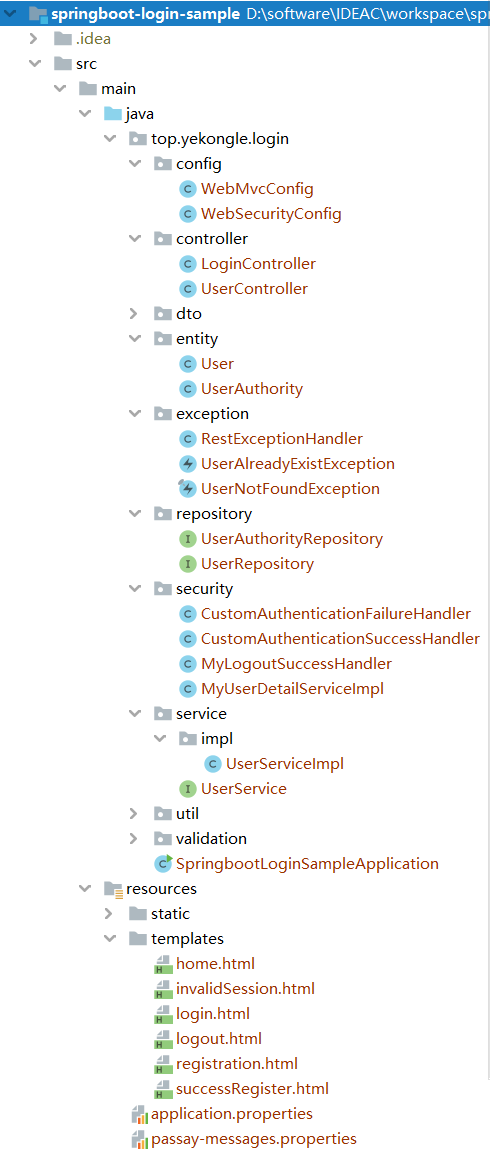
项目结构图如下:
![]()
pom 依赖如下:
1
2
3
4
5
6
7
8
9
10
11
12
13
14
15
16
17
18
19
20
21
22
23
24
25
26
27
28
29
30
31
32
33
34
35
36
37
38
39
40
41
42
43
44
45
46
47
48
49
50
51
52
53
54
55
56
57
58
59
60
61
62
63
64
65
66
67
68
69
70
71
72
73
74
75
76
77
78
79
80
81
82
83
84
85
86
87
88
89
90
91
92
93
94
| <?xml version="1.0" encoding="UTF-8"?>
<project xmlns="http://maven.apache.org/POM/4.0.0" xmlns:xsi="http://www.w3.org/2001/XMLSchema-instance"
xsi:schemaLocation="http://maven.apache.org/POM/4.0.0 https://maven.apache.org/xsd/maven-4.0.0.xsd">
<modelVersion>4.0.0</modelVersion>
<parent>
<groupId>org.springframework.boot</groupId>
<artifactId>spring-boot-starter-parent</artifactId>
<version>2.2.5.RELEASE</version>
<relativePath/>
</parent>
<groupId>top.yekongle</groupId>
<artifactId>springboot-login-sample</artifactId>
<version>0.0.1-SNAPSHOT</version>
<name>spring-boot-starter-parent</name>
<description>Login sample for Spring Boot</description>
<properties>
<java.version>1.8</java.version>
<passay.version>1.5.0</passay.version>
<guava.version>29.0-jre</guava.version>
</properties>
<dependencies>
<dependency>
<groupId>org.springframework.boot</groupId>
<artifactId>spring-boot-starter-web</artifactId>
</dependency>
<dependency>
<groupId>org.springframework.boot</groupId>
<artifactId>spring-boot-starter-security</artifactId>
</dependency>
<dependency>
<groupId>org.springframework.boot</groupId>
<artifactId>spring-boot-starter-data-jpa</artifactId>
</dependency>
<dependency>
<groupId>org.springframework.boot</groupId>
<artifactId>spring-boot-starter-thymeleaf</artifactId>
</dependency>
<dependency>
<groupId>org.passay</groupId>
<artifactId>passay</artifactId>
<version>${passay.version}</version>
</dependency>
<dependency>
<groupId>com.google.guava</groupId>
<artifactId>guava</artifactId>
<version>${guava.version}</version>
</dependency>
<dependency>
<groupId>com.h2database</groupId>
<artifactId>h2</artifactId>
<scope>runtime</scope>
</dependency>
<dependency>
<groupId>org.springframework.boot</groupId>
<artifactId>spring-boot-devtools</artifactId>
<scope>runtime</scope>
<optional>true</optional>
</dependency>
<dependency>
<groupId>org.projectlombok</groupId>
<artifactId>lombok</artifactId>
<optional>true</optional>
</dependency>
<dependency>
<groupId>org.springframework.boot</groupId>
<artifactId>spring-boot-starter-test</artifactId>
<scope>test</scope>
<exclusions>
<exclusion>
<groupId>org.junit.vintage</groupId>
<artifactId>junit-vintage-engine</artifactId>
</exclusion>
</exclusions>
</dependency>
<dependency>
<groupId>org.springframework.security</groupId>
<artifactId>spring-security-test</artifactId>
<scope>test</scope>
</dependency>
</dependencies>
<build>
<plugins>
<plugin>
<groupId>org.springframework.boot</groupId>
<artifactId>spring-boot-maven-plugin</artifactId>
</plugin>
</plugins>
</build>
</project>
|
代码编写
这里主要写出改动或新增的类,其他的则和注册实现篇基本一致
用户角色
UserAuthority.java
1
2
3
4
5
6
7
8
9
10
11
12
13
14
15
16
17
18
19
20
21
22
23
24
25
| package top.yekongle.login.entity;
import javax.persistence.Entity;
import javax.persistence.GeneratedValue;
import javax.persistence.Id;
import lombok.Data;
import lombok.NoArgsConstructor;
@Entity
@Data
@NoArgsConstructor
public class UserAuthority {
@Id
@GeneratedValue
private Long id;
private String username;
private String role;
}
|
用户角色操作接口
UserAuthorityRepository.java
1
2
3
4
5
6
7
8
9
10
11
12
13
14
15
16
| package top.yekongle.login.repository;
import java.util.List;
import org.springframework.data.jpa.repository.JpaRepository;
import top.yekongle.login.entity.UserAuthority;
public interface UserAuthorityRepository extends JpaRepository<UserAuthority, Long> {
List<UserAuthority> findByUsername(String username);
}
|
注册方法,注册用户时默认指定一个 “ROLE_USER” 角色并保存
UserServiceImpl.java
1
2
3
4
5
6
7
8
9
10
11
12
13
14
15
16
17
18
19
20
21
22
23
24
25
26
27
28
29
30
31
32
33
34
35
36
37
38
39
40
41
42
43
44
45
46
47
48
49
50
51
52
53
54
55
56
57
58
59
60
61
| package top.yekongle.login.service.impl;
import java.util.Arrays;
import javax.transaction.Transactional;
import org.springframework.beans.factory.annotation.Autowired;
import org.springframework.security.crypto.password.PasswordEncoder;
import org.springframework.stereotype.Service;
import lombok.extern.slf4j.Slf4j;
import top.yekongle.login.dto.UserDTO;
import top.yekongle.login.entity.User;
import top.yekongle.login.entity.UserAuthority;
import top.yekongle.login.exception.UserAlreadyExistException;
import top.yekongle.login.repository.UserAuthorityRepository;
import top.yekongle.login.repository.UserRepository;
import top.yekongle.login.service.UserService;
@Slf4j
@Service
public class UserServiceImpl implements UserService {
@Autowired
private UserRepository userRepository;
@Autowired
private UserAuthorityRepository userAuthorityRepository;
@Autowired
private PasswordEncoder passwordEncoder;
@Transactional
@Override
public User registerNewUserAccount(UserDTO userDTO) throws UserAlreadyExistException {
if (emailExists(userDTO.getEmail())) {
throw new UserAlreadyExistException("该邮箱已被注册:" + userDTO.getEmail());
}
log.info("UserDTO:" + userDTO.toString());
User user = new User();
user.setEmail(userDTO.getEmail());
user.setPassword(passwordEncoder.encode(userDTO.getPassword()));
userRepository.save(user);
UserAuthority userAuthority = new UserAuthority();
userAuthority.setUsername(userDTO.getEmail());
userAuthority.setRole("ROLE_USER");
userAuthorityRepository.save(userAuthority);
return user;
}
private boolean emailExists(String email) {
return userRepository.findByEmail(email) != null;
}
}
|
web mvc 配置,这里主要指定直接返回的页面
WebMvcConfig.java
1
2
3
4
5
6
7
8
9
10
11
12
13
14
15
16
17
18
19
20
21
22
23
24
25
26
27
28
29
30
31
32
33
34
| package top.yekongle.login.config;
import java.util.Locale;
import org.springframework.web.servlet.LocaleResolver;
import org.springframework.context.annotation.Bean;
import org.springframework.context.annotation.Configuration;
import org.springframework.web.servlet.config.annotation.ViewControllerRegistry;
import org.springframework.web.servlet.config.annotation.WebMvcConfigurer;
import org.springframework.web.servlet.i18n.CookieLocaleResolver;
@Configuration
public class WebMvcConfig implements WebMvcConfigurer {
@Override
public void addViewControllers(ViewControllerRegistry registry) {
registry.addViewController("/").setViewName("forward:/login");
registry.addViewController("/registration.html");
registry.addViewController("/successRegister.html");
registry.addViewController("/home.html");
registry.addViewController("/logout.html");
registry.addViewController("/invalidSession.html");
}
}
|
web 安全配置,主要包括自定义用户认证,登入登出配置,访问控制,session 管理等。
WebSecurityConfig.java
1
2
3
4
5
6
7
8
9
10
11
12
13
14
15
16
17
18
19
20
21
22
23
24
25
26
27
28
29
30
31
32
33
34
35
36
37
38
39
40
41
42
43
44
45
46
47
48
49
50
51
52
53
54
55
56
57
58
59
60
61
62
63
64
65
66
67
68
69
70
71
72
73
74
75
76
77
78
79
80
81
82
83
84
85
86
87
88
89
90
91
92
93
94
95
96
97
98
99
100
101
102
103
104
105
106
107
108
109
110
111
112
113
114
115
116
117
118
119
120
121
122
123
124
125
126
127
128
129
130
| package top.yekongle.login.config;
import org.springframework.beans.factory.annotation.Autowired;
import org.springframework.context.annotation.Bean;
import org.springframework.context.annotation.Configuration;
import org.springframework.http.HttpMethod;
import org.springframework.security.authentication.dao.DaoAuthenticationProvider;
import org.springframework.security.config.annotation.authentication.builders.AuthenticationManagerBuilder;
import org.springframework.security.config.annotation.web.builders.HttpSecurity;
import org.springframework.security.config.annotation.web.configuration.WebSecurityConfigurerAdapter;
import org.springframework.security.core.session.SessionRegistry;
import org.springframework.security.core.session.SessionRegistryImpl;
import org.springframework.security.core.userdetails.UserDetailsService;
import org.springframework.security.crypto.bcrypt.BCryptPasswordEncoder;
import org.springframework.security.crypto.password.PasswordEncoder;
import org.springframework.security.web.authentication.AuthenticationFailureHandler;
import org.springframework.security.web.authentication.AuthenticationSuccessHandler;
import org.springframework.security.web.session.HttpSessionEventPublisher;
import top.yekongle.login.security.MyLogoutSuccessHandler;
import top.yekongle.login.security.MyUserDetailServiceImpl;
@Configuration
public class WebSecurityConfig extends WebSecurityConfigurerAdapter {
@Autowired
private MyUserDetailServiceImpl userDetailsService;
@Autowired
private AuthenticationSuccessHandler authenticationSuccessHandler;
@Autowired
private AuthenticationFailureHandler authenticationFailureHandler;
@Autowired
private MyLogoutSuccessHandler myLogoutSuccessHandler;
@Bean
public PasswordEncoder passwordEncoder() {
return new BCryptPasswordEncoder();
}
@Bean
public DaoAuthenticationProvider authenticationProvider() {
DaoAuthenticationProvider authenticationProvider = new DaoAuthenticationProvider();
authenticationProvider.setUserDetailsService(userDetailsService);
authenticationProvider.setPasswordEncoder(passwordEncoder());
return authenticationProvider;
}
@Bean
public HttpSessionEventPublisher httpSessionEventPublisher() {
return new HttpSessionEventPublisher();
}
@Bean
public SessionRegistry sessionRegistry() {
return new SessionRegistryImpl();
}
@Override
protected void configure(AuthenticationManagerBuilder auth) throws Exception {
auth.authenticationProvider(authenticationProvider());
}
@Override
protected void configure(HttpSecurity http) throws Exception {
http
.csrf().disable()
.authorizeRequests()
.antMatchers("/h2/**").permitAll()
.antMatchers("/css/**", "/js/**", "/fonts/**").permitAll()
.antMatchers(HttpMethod.OPTIONS, "/**").permitAll()
.antMatchers("/user/registration*", "/registration*", "/successRegister*", "/login*", "/logout*").permitAll()
.antMatchers("/invalidSession*").anonymous()
.anyRequest().authenticated()
.and()
.formLogin().loginPage("/login")
.successHandler(authenticationSuccessHandler)
.failureHandler(authenticationFailureHandler)
.permitAll()
.and()
.sessionManagement()
.invalidSessionUrl("/invalidSession.html")
.maximumSessions(1).sessionRegistry(sessionRegistry()).and()
.sessionFixation().migrateSession()
.and()
.logout()
.logoutSuccessHandler(myLogoutSuccessHandler)
.invalidateHttpSession(false)
.deleteCookies("JSESSIONID")
.permitAll();
}
}
|
实现用户信息接口,自定义获取用户信息的方法,主要时实现了 loadUserByUsername 方法,并返回一个封装了用户账号,密码,权限等信息的 UserDetails 类型的实例 User。
MyUserDetailServiceImpl.java
1
2
3
4
5
6
7
8
9
10
11
12
13
14
15
16
17
18
19
20
21
22
23
24
25
26
27
28
29
30
31
32
33
34
35
36
37
38
39
40
41
42
43
44
45
46
47
48
49
50
51
52
53
54
55
56
57
58
59
60
61
62
63
64
65
| package top.yekongle.login.security;
import java.util.ArrayList;
import java.util.List;
import javax.transaction.Transactional;
import org.springframework.beans.factory.annotation.Autowired;
import org.springframework.security.core.GrantedAuthority;
import org.springframework.security.core.authority.SimpleGrantedAuthority;
import org.springframework.security.core.userdetails.UserDetails;
import org.springframework.security.core.userdetails.UserDetailsService;
import org.springframework.security.core.userdetails.UsernameNotFoundException;
import org.springframework.stereotype.Service;
import lombok.extern.slf4j.Slf4j;
import top.yekongle.login.repository.UserAuthorityRepository;
import top.yekongle.login.repository.UserRepository;
import top.yekongle.login.entity.User;
import top.yekongle.login.entity.UserAuthority;
@Slf4j
@Service("userDetailsService")
@Transactional
public class MyUserDetailServiceImpl implements UserDetailsService {
@Autowired
private UserRepository userRepository;
@Autowired
private UserAuthorityRepository userAuthorityRepository;
@Override
public UserDetails loadUserByUsername(String email) throws UsernameNotFoundException {
log.info("Email:" + email);
User user = userRepository.findByEmail(email);
if (user == null) {
throw new UsernameNotFoundException("找不到该用户: "+ email);
}
boolean enabled = true;
boolean accountNonExpired = true;
boolean credentialsNonExpired = true;
boolean accountNonLocked = true;
return new org.springframework.security.core.userdetails
.User(user.getEmail(), user.getPassword(), enabled, accountNonExpired
, credentialsNonExpired, accountNonLocked, getAuthorities(user.getEmail()));
}
private List<GrantedAuthority> getAuthorities (String username) {
List<GrantedAuthority> authorities = new ArrayList<>();
List<UserAuthority> userAuthorityList = userAuthorityRepository.findByUsername(username);
log.info("role size:" + userAuthorityList.size());
for (UserAuthority userAuthority : userAuthorityList) {
authorities.add(new SimpleGrantedAuthority(userAuthority.getRole()));
}
return authorities;
}
}
|
自定义登录成功处理器,这里主要是设置会话有效期和指定重定向页面
CustomAuthenticationSuccessHandler.java
1
2
3
4
5
6
7
8
9
10
11
12
13
14
15
16
17
18
19
20
21
22
23
24
25
26
27
28
29
30
31
32
33
34
35
36
37
38
39
40
41
42
43
44
45
46
47
48
49
50
51
52
53
54
55
56
57
58
59
60
61
62
63
64
65
66
67
| package top.yekongle.login.security;
import java.io.IOException;
import javax.servlet.ServletException;
import javax.servlet.http.HttpServletRequest;
import javax.servlet.http.HttpServletResponse;
import javax.servlet.http.HttpSession;
import org.springframework.security.core.Authentication;
import org.springframework.security.core.userdetails.UserDetails;
import org.springframework.security.web.DefaultRedirectStrategy;
import org.springframework.security.web.RedirectStrategy;
import org.springframework.security.web.WebAttributes;
import org.springframework.security.web.authentication.AuthenticationSuccessHandler;
import org.springframework.stereotype.Component;
import lombok.extern.slf4j.Slf4j;
@Slf4j
@Component("authenticationSuccessHandler")
public class CustomAuthenticationSuccessHandler implements AuthenticationSuccessHandler {
private RedirectStrategy redirectStrategy = new DefaultRedirectStrategy();
@Override
public void onAuthenticationSuccess(HttpServletRequest request, HttpServletResponse response,
Authentication authentication) throws IOException, ServletException {
log.info("onAuthenticationSuccess");
redirectStrategy.sendRedirect(request, response, "/home.html");
final HttpSession session = request.getSession(false);
if (session != null) {
session.setMaxInactiveInterval(30*60);
String username = this.getCurrentUsername(authentication);
session.setAttribute("user", username);
}
clearAuthenticationAttributes(request);
}
private String getCurrentUsername(Authentication authentication) {
String username = null;
if (authentication.getPrincipal() instanceof UserDetails) {
username = ((UserDetails) authentication.getPrincipal()).getUsername();
} else {
username = authentication.getName();
}
return username;
}
protected void clearAuthenticationAttributes(final HttpServletRequest request) {
final HttpSession session = request.getSession(false);
if (session == null) {
return;
}
session.removeAttribute(WebAttributes.AUTHENTICATION_EXCEPTION);
}
}
|
自定义登录失败处理器,控制跳转,返回错误信息
CustomAuthenticationFailureHandler.java
1
2
3
4
5
6
7
8
9
10
11
12
13
14
15
16
17
18
19
20
21
22
23
24
25
26
27
28
29
30
31
32
33
34
| package top.yekongle.login.security;
import java.io.IOException;
import java.util.Locale;
import javax.servlet.ServletException;
import javax.servlet.http.HttpServletRequest;
import javax.servlet.http.HttpServletResponse;
import org.springframework.beans.factory.annotation.Autowired;
import org.springframework.context.MessageSource;
import org.springframework.security.core.AuthenticationException;
import org.springframework.security.web.WebAttributes;
import org.springframework.security.web.authentication.SimpleUrlAuthenticationFailureHandler;
import org.springframework.stereotype.Component;
import org.springframework.web.servlet.LocaleResolver;
import lombok.extern.slf4j.Slf4j;
@Slf4j
@Component("authenticationFailureHandler")
public class CustomAuthenticationFailureHandler extends SimpleUrlAuthenticationFailureHandler {
@Override
public void onAuthenticationFailure(final HttpServletRequest request, final HttpServletResponse response, final AuthenticationException exception) throws IOException, ServletException {
log.info("onAuthenticationFailure");
setDefaultFailureUrl("/login?error=true");
super.onAuthenticationFailure(request, response, exception);
request.getSession()
.setAttribute(WebAttributes.AUTHENTICATION_EXCEPTION, exception.getMessage());
}
}
|
注销登录成功处理
MyLogoutSuccessHandler.java
1
2
3
4
5
6
7
8
9
10
11
12
13
14
15
16
17
18
19
20
21
22
23
24
25
26
27
28
29
30
31
32
33
| package top.yekongle.login.security;
import java.io.IOException;
import javax.servlet.ServletException;
import javax.servlet.http.HttpServletRequest;
import javax.servlet.http.HttpServletResponse;
import javax.servlet.http.HttpSession;
import org.springframework.security.core.Authentication;
import org.springframework.security.web.authentication.logout.LogoutSuccessHandler;
import org.springframework.stereotype.Component;
@Component("myLogoutSuccessHandler")
public class MyLogoutSuccessHandler implements LogoutSuccessHandler {
@Override
public void onLogoutSuccess(HttpServletRequest request, HttpServletResponse response, Authentication authentication) throws IOException, ServletException {
final HttpSession session = request.getSession();
if (session != null) {
session.removeAttribute("user");
}
response.sendRedirect("/logout.html?logSucc=true");
}
}
|
登录请求处理
LoginController.java
1
2
3
4
5
6
7
8
9
10
11
12
13
14
15
16
17
18
19
20
21
22
23
24
25
26
27
| package top.yekongle.login.controller;
import org.springframework.security.authentication.AnonymousAuthenticationToken;
import org.springframework.security.core.Authentication;
import org.springframework.security.core.context.SecurityContextHolder;
import org.springframework.stereotype.Controller;
import org.springframework.web.bind.annotation.GetMapping;
@Controller
public class LoginController {
@GetMapping("/login")
public String login() {
Authentication auth = SecurityContextHolder.getContext().getAuthentication();
if (auth instanceof AnonymousAuthenticationToken) {
return "login";
} else {
return "home";
}
}
}
|
登录页面
loign.html
1
2
3
4
5
6
7
8
9
10
11
12
13
14
15
16
17
18
19
20
21
22
23
24
25
26
27
28
29
30
31
32
33
34
35
36
37
38
39
40
41
42
43
44
45
46
47
48
49
50
51
52
53
54
55
56
57
58
59
60
61
62
| <html xmlns:th="http://www.thymeleaf.org">
<head>
<meta content="text/html;charset=UTF-8"/>
<meta name="viewport" content="width=device-width, initial-scale=1"/>
<link th:href="@{/css/bootstrap.min.css}" rel="stylesheet"/>
<style type="text/css">
.middle {
float: none;
display: inline-block;
vertical-align: middle;
}
</style>
</head>
<body>
<div th:if="${param.error != null}" class="alert alert-danger" th:utext="${session[SPRING_SECURITY_LAST_EXCEPTION]}">error</div>
<div class="container">
<h2>登录</h2>
<br/>
<form name='loginForm' action="login" method="POST" onsubmit="return validate();">
<div class="row">
<div class="form-group col-md-6 vertical-middle-sm">
<label for="email">邮箱</label>
<input type="email" class="form-control" name="username" aria-describedby="emailHelp">
</div>
</div>
<div class="row">
<div class="form-group col-md-6">
<label for="password">密码</label>
<input type="password" class="form-control" id="password" name="password">
</div>
</div>
<button type="submit" class="btn btn-primary">登录</button>
<a class="btn btn-default" th:href="@{/registration.html}" >没有账号?</a>
</form>
</div>
<script th:src="@{/js/jquery-3.5.1.min.js}" type="text/javascript"></script>
<script th:src="@{/js/bootstrap.min.js}" type="text/javascript"></script>
<script th:inline="javascript">
function validate() {
if (document.loginForm.username.value == "" && document.loginForm.password.value == "") {
alert("账号密码不能为空!");
document.loginForm.username.focus();
return false;
}
if (document.loginForm.username.value == "") {
alert("账号不能为空!");
document.loginForm.username.focus();
return false;
}
if (document.loginForm.password.value == "") {
alert("密码不能为空!");
document.loginForm.password.focus();
return false;
}
}
</script>
</body>
</html>
|
主页
home.html
1
2
3
4
5
6
7
8
9
10
11
12
13
14
15
16
17
18
19
20
21
22
23
24
25
26
27
28
| <html xmlns:th="http://www.thymeleaf.org">
<head>
<meta content="text/html;charset=UTF-8"/>
<meta name="viewport" content="width=device-width, initial-scale=1"/>
<link th:href="@{/css/bootstrap.min.css}" rel="stylesheet"/>
</head>
<body>
<nav class="navbar navbar-default">
<div class="container-fluid">
<div class="navbar-header">
<a class="navbar-brand" href="#">home</a>
</div>
<ul class="nav navbar-nav navbar-right">
<li><a style="color:blue;" th:text="${session[user]}" >yekongle</a></li>
<li><a style="color:orange;" th:href="@{/logout}" >logout</a></li>
</ul>
</div>
</nav>
<script th:src="@{/js/jquery-3.5.1.min.js}" type="text/javascript"></script>
<script th:src="@{/js/bootstrap.min.js}" type="text/javascript"></script>
<script th:inline="javascript">
</script>
</body>
</html>
|
注销登录结果页面
logout.html
1
2
3
4
5
6
7
8
9
10
11
12
13
14
15
16
17
18
| <html xmlns:th="http://www.thymeleaf.org">
<head>
<meta content="text/html;charset=UTF-8"/>
<meta name="viewport" content="width=device-width, initial-scale=1"/>
<link th:href="@{/css/bootstrap.min.css}" rel="stylesheet"/>
</head>
<body>
<div class="container">
<h1 id="error" class="alert alert-danger" th:if="${session[SPRING_SECURITY_LAST_EXCEPTION]}" >退出登录失败</h1>
<h1 id="success" class="alert alert-info" th:if="${param.logSucc}" >退出登录成功</h1>
<br/><br/><br/>
<a class="btn btn-primary" th:href="@{/login}" >登录</a>
</div>
</body>
</html>
|
无效 session 页面
invalidSession.html
1
2
3
4
5
6
7
8
9
10
11
12
13
14
15
16
17
| <html xmlns:th="http://www.thymeleaf.org">
<head>
<meta content="text/html;charset=UTF-8"/>
<meta name="viewport" content="width=device-width, initial-scale=1"/>
<link th:href="@{/css/bootstrap.min.css}" rel="stylesheet"/>
</head>
<body>
<div class="container">
<h1 class="alert alert-danger" >登录过期,请重新登录</h1>
<a class="btn btn-primary" th:href="@{/login}" >重新登录</a>
</div>
<script th:src="@{/js/jquery-3.5.1.min.js}" type="text/javascript"></script>
<script th:src="@{/js/bootstrap.min.js}" type="text/javascript"></script>
</body>
</html>
|
运行演示
启动项目
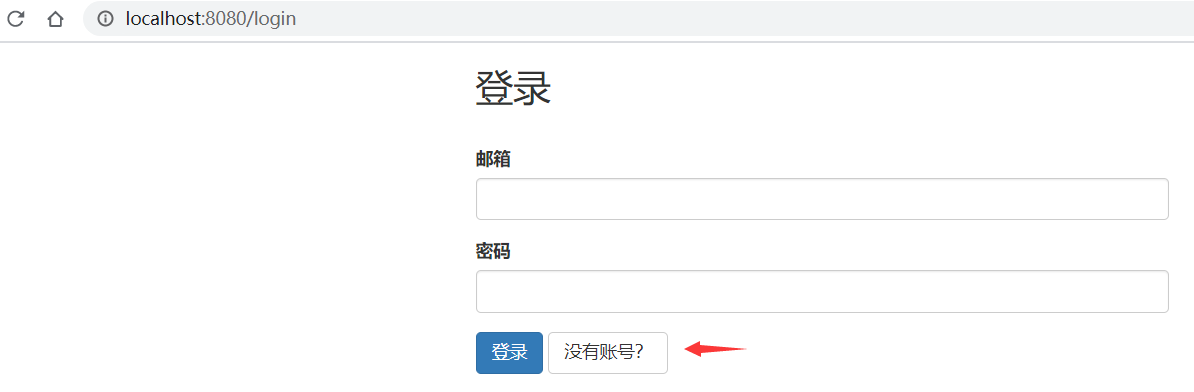
- 访问 http://localhost:8080,会自动跳到登录页面,先点击跳到注册页面
![]()
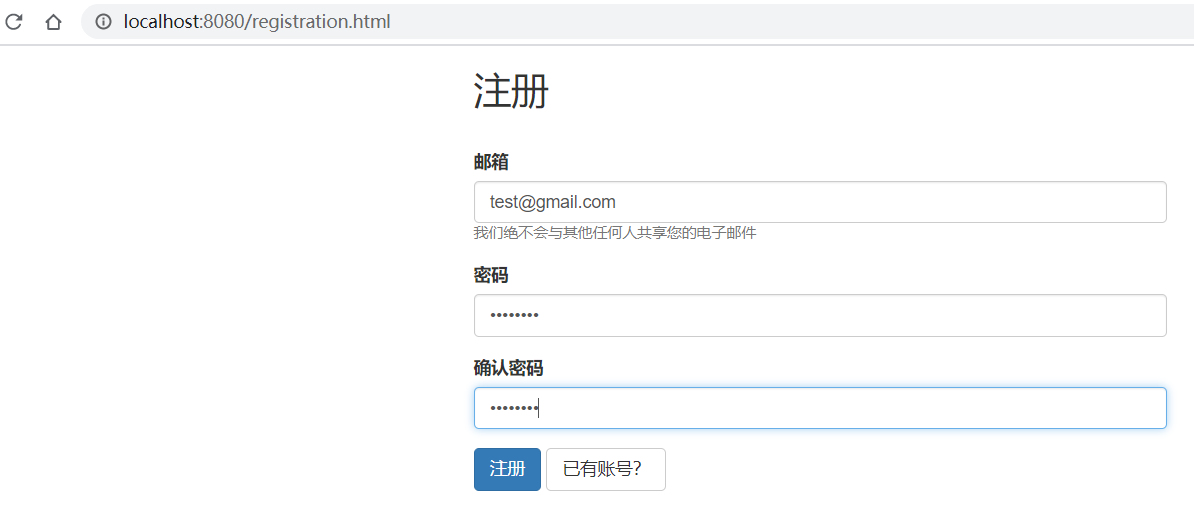
注册账号,邮箱:test@gmail.com 密码:A123456!
![]()
注册成功,立即登录
![]()
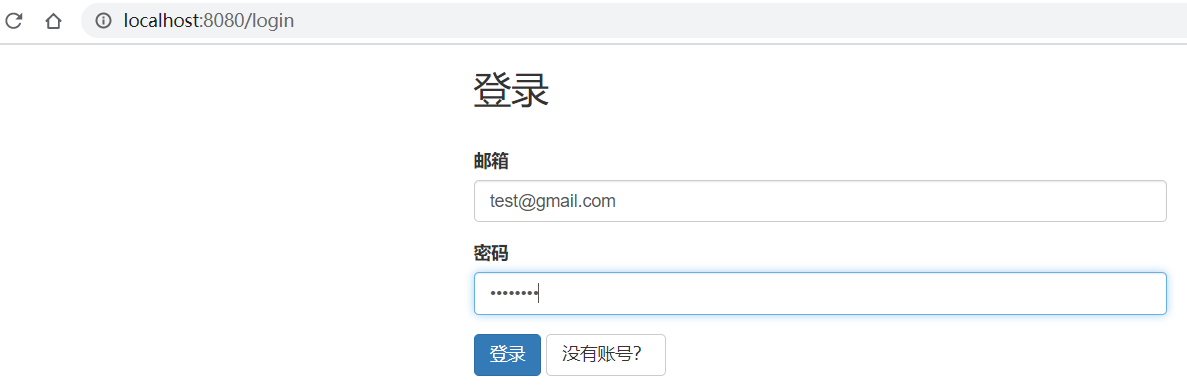
输入刚刚注册的邮箱和密码
![]()
登录成功,跳转到主页,右侧可以显示返回了用户的邮箱
![]()
- 如果超过了设定的会话有效期 30 min 没有操作行为,则会过期
![]()
- 点击 logout,注销成功
![]()
项目已上传至 Github: https://github.com/yekongle/springboot-code-samples/tree/master/springboot-login-sample , 希望对小伙伴们有帮助哦。
参考链接: