前言
各位小伙伴有没有发现,现在的网站基本都用上了 HTTP,因为 HTTP的通信是明文的,容易被不怀好意的人监听通信,窥探用户的隐私,这简直就是裸奔。而 HTTPS 使用 SSL 证书在加密通信前进行身份验证,协商加密算法以及交换密钥,可以满足基本的安全需求,即防窃取,防篡改,防钓鱼。
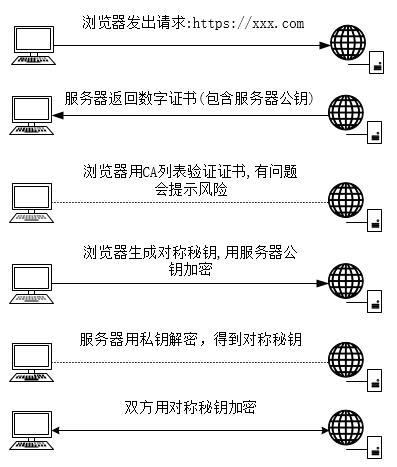
https 通信的流程如下:
![]()
可见数字证书非常重要,正规是使用权威的CA机构颁发的SSL证书的,可以在阿里云购买 CA 授权颁发的证书。一般个人用的话购买免费 DV SSL就行了,有效期一年。
![]()
但下面为了方便演示,用 jdk 自带工具 keytool 生成一个自签名的数字证书。
创建项目
生成证书
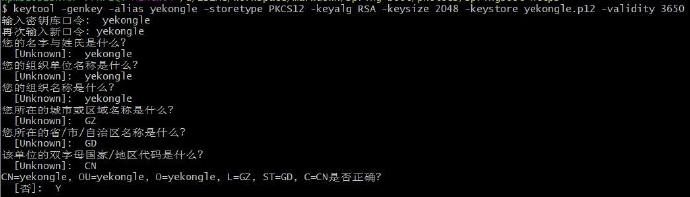
选择一个目录,打开命令行窗口,输入如下命令
1
| keytool -genkey -alias yekong -storetype PKCS12 -keyalg RSA -keysize 2048 -keystore yekong.p12 -validity 3650
|
参数说明:
- genkey: 生成SSL证书
- alias: 证书别名
- storetype: 秘钥仓库类型
- keyalg: 生成证书算法
- keysize: 证书大小
- keystore: 生成证书保存路径,也是证书名称
- validity: 证书有效期
![]()
然后会在该目录下生成证书。
IDEA新建一个项目
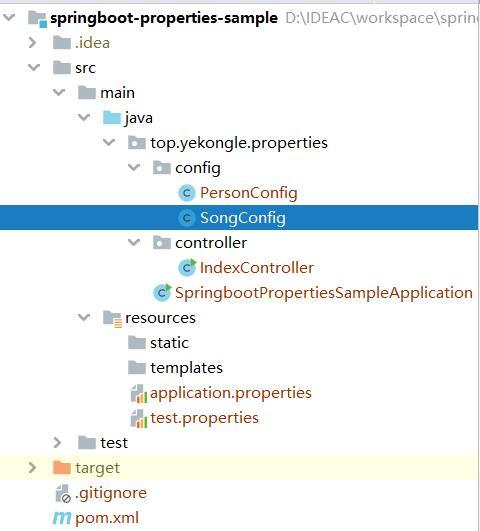
项目结构如下,将前面生成的证书放到 src/main/resources 下。
![]()
pom 依赖如下:
1
2
3
4
5
6
7
8
9
10
11
12
13
14
15
16
17
18
19
20
21
22
23
24
25
26
27
28
29
30
31
32
33
34
35
36
37
38
39
40
41
42
43
44
45
46
47
48
49
50
51
52
53
54
55
56
57
58
59
60
61
62
63
64
| <?xml version="1.0" encoding="UTF-8"?>
<project xmlns="http://maven.apache.org/POM/4.0.0" xmlns:xsi="http://www.w3.org/2001/XMLSchema-instance"
xsi:schemaLocation="http://maven.apache.org/POM/4.0.0 https://maven.apache.org/xsd/maven-4.0.0.xsd">
<modelVersion>4.0.0</modelVersion>
<parent>
<groupId>org.springframework.boot</groupId>
<artifactId>spring-boot-starter-parent</artifactId>
<version>2.2.5.RELEASE</version>
<relativePath/>
</parent>
<groupId>top.yekongle</groupId>
<artifactId>springboot-https-sample</artifactId>
<version>0.0.1-SNAPSHOT</version>
<name>springboot-https-sample</name>
<description>Https sample for Spring Boot</description>
<properties>
<java.version>1.8</java.version>
</properties>
<dependencies>
<dependency>
<groupId>org.springframework.boot</groupId>
<artifactId>spring-boot-starter-thymeleaf</artifactId>
</dependency>
<dependency>
<groupId>org.springframework.boot</groupId>
<artifactId>spring-boot-starter-web</artifactId>
</dependency>
<dependency>
<groupId>org.springframework.boot</groupId>
<artifactId>spring-boot-devtools</artifactId>
<scope>runtime</scope>
<optional>true</optional>
</dependency>
<dependency>
<groupId>org.projectlombok</groupId>
<artifactId>lombok</artifactId>
<optional>true</optional>
</dependency>
<dependency>
<groupId>org.springframework.boot</groupId>
<artifactId>spring-boot-starter-test</artifactId>
<scope>test</scope>
<exclusions>
<exclusion>
<groupId>org.junit.vintage</groupId>
<artifactId>junit-vintage-engine</artifactId>
</exclusion>
</exclusions>
</dependency>
</dependencies>
<build>
<plugins>
<plugin>
<groupId>org.springframework.boot</groupId>
<artifactId>spring-boot-maven-plugin</artifactId>
</plugin>
</plugins>
</build>
</project>
|
代码编写
application.properties
全局配置如下
1
2
3
4
5
6
7
8
9
10
11
12
13
14
15
16
17
18
19
|
server.port=443
server.ssl.key-store=classpath:yekong.p12
server.ssl.key-store-password=yekong
server.ssl.key-store-type=PKCS12
server.ssl.key-alias=yekong
spring.thymeleaf.prefix=classpath:/templates/
spring.thymeleaf.suffix=.html
spring.thymeleaf.mode=HTML5
spring.thymeleaf.encoding=UTF-8
|
login.html
创建一个 login 页面作为返回演示
1
2
3
4
5
6
7
8
9
10
11
12
13
14
15
16
17
18
19
20
| <!DOCTYPE html>
<html lang="en">
<head>
<meta charset="utf-8">
<title>Home</title>
<style type="text/css">
.central{
width: 100%;
height: auto;
position: relative;
text-align: center;
}
</style>
</head>
<body>
<div class="central">
<h1>Spring Boot https sample</h1>
</div>
</body>
</html>
|
ServerConfig.java
配置tomcat,当访问http时可以跳转到https
1
2
3
4
5
6
7
8
9
10
11
12
13
14
15
16
17
18
19
20
21
22
23
24
25
26
27
28
29
30
31
32
33
34
35
36
37
38
39
40
41
42
43
44
45
46
47
48
49
50
51
52
53
54
55
56
57
| package top.yekongle.https.config;
import org.apache.catalina.Context;
import org.apache.catalina.connector.Connector;
import org.apache.tomcat.util.descriptor.web.SecurityCollection;
import org.apache.tomcat.util.descriptor.web.SecurityConstraint;
import org.springframework.boot.web.embedded.tomcat.TomcatServletWebServerFactory;
import org.springframework.context.annotation.Bean;
import org.springframework.context.annotation.Configuration;
@Configuration
public class ServerConfig {
@Bean
public TomcatServletWebServerFactory servletContainer() {
TomcatServletWebServerFactory tomcat = new TomcatServletWebServerFactory() {
@Override
protected void postProcessContext(Context context) {
SecurityConstraint securityConstraint = new SecurityConstraint();
securityConstraint.setUserConstraint("CONFIDENTIAL");
SecurityCollection collection = new SecurityCollection();
collection.addPattern("/*");
securityConstraint.addCollection(collection);
context.addConstraint(securityConstraint);
}
};
tomcat.addAdditionalTomcatConnectors(initiateHttpConnector());
return tomcat;
}
private Connector initiateHttpConnector() {
Connector connector = new Connector("org.apache.coyote.http11.Http11NioProtocol");
connector.setScheme("http");
connector.setPort(80);
connector.setSecure(false);
connector.setRedirectPort(443);
return connector;
}
}
|
LoginController.java
接收 /login 请求,跳到 login页面
1
2
3
4
5
6
7
8
9
10
11
12
13
14
| package top.yekongle.https.controller;
import org.springframework.stereotype.Controller;
import org.springframework.web.bind.annotation.RequestMapping;
@Controller
public class LoginController {
@RequestMapping("/login")
public String index() {
return "login";
}
}
|
测试演示
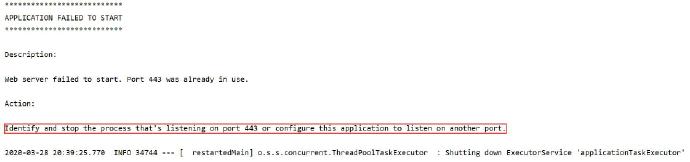
启动项目,发现控制台报错
![]()
原来是端口被占用,这种情况时常有之,打开cmd
1
2
3
4
5
6
7
8
9
|
netstat -ano | find "443"
TCP 0.0.0.0:443 0.0.0.0:0 LISTENING 6252
netstat -ano | find "6252"
vmware-hostd.exe 6252 Services 0 27,324 K
|
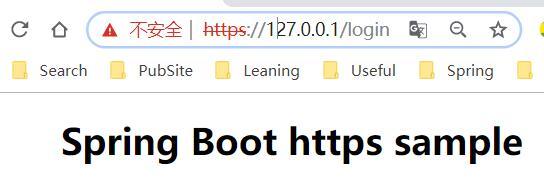
重新启动项目正常,浏览器输入地址如下,可以自动转到https。
![]()
项目已上传至 Github: https://github.com/yekongle/springboot-code-samples/tree/master/springboot-https-sample , 希望对小伙伴们有帮助哦。