前言
在很多网站我们可以看到可以切换语言的按钮,如果网站需要面向海外用户,那么实现网站语言国际化就显得非常必要。在 Spring Boot 中,我们可以非常方便地实现这个语言国际化的功能,下面就开始动手来实践一个可以中英切换的登录页面吧。
创建项目
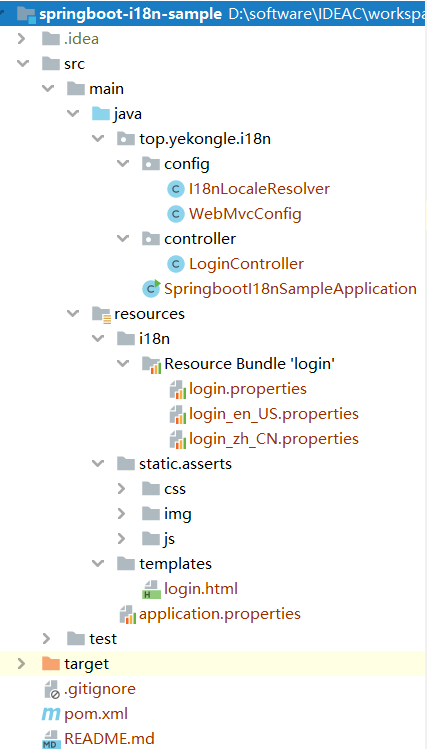
项目结构图如下:
![]()
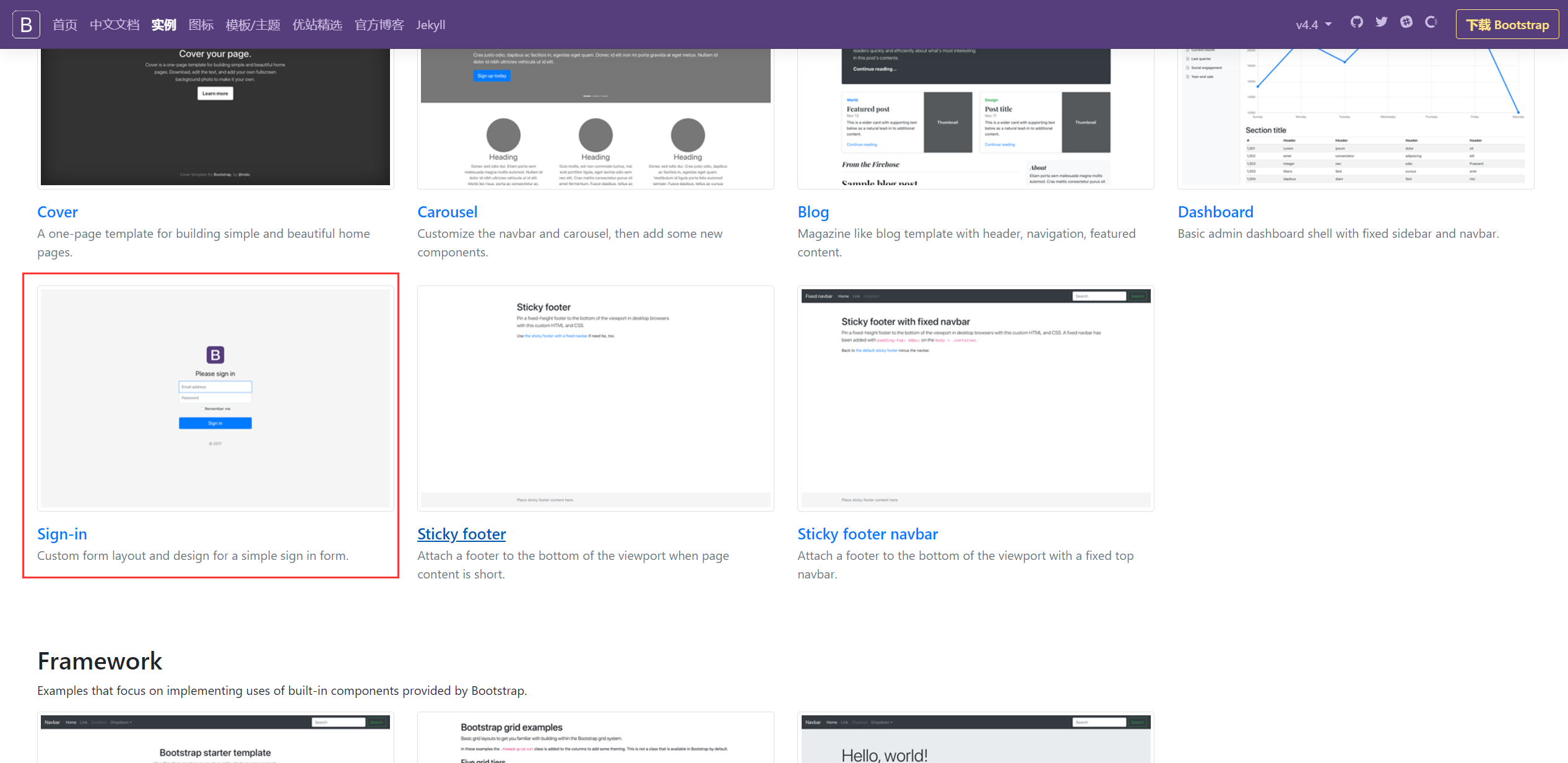
这里的登录页面使用的是 Bootstrap 官方的一个实例,下载下来,把相关静态资源文件导入到 resources 目录就好。
![]()
pom 依赖如下:
1
2
3
4
5
6
7
8
9
10
11
12
13
14
15
16
17
18
19
20
21
22
23
24
25
26
27
28
29
30
31
32
33
34
35
36
37
38
39
40
41
42
43
44
45
46
47
48
49
50
51
52
53
54
55
56
57
58
59
60
61
62
63
64
| <?xml version="1.0" encoding="UTF-8"?>
<project xmlns="http://maven.apache.org/POM/4.0.0" xmlns:xsi="http://www.w3.org/2001/XMLSchema-instance"
xsi:schemaLocation="http://maven.apache.org/POM/4.0.0 https://maven.apache.org/xsd/maven-4.0.0.xsd">
<modelVersion>4.0.0</modelVersion>
<parent>
<groupId>org.springframework.boot</groupId>
<artifactId>spring-boot-starter-parent</artifactId>
<version>2.2.5.RELEASE</version>
<relativePath/>
</parent>
<groupId>top.yekongle</groupId>
<artifactId>springboot-i18n-sample</artifactId>
<version>0.0.1-SNAPSHOT</version>
<name>springboot-i18n-sample</name>
<description>i18n sample for Spring Boot</description>
<properties>
<java.version>1.8</java.version>
</properties>
<dependencies>
<dependency>
<groupId>org.springframework.boot</groupId>
<artifactId>spring-boot-starter-thymeleaf</artifactId>
</dependency>
<dependency>
<groupId>org.springframework.boot</groupId>
<artifactId>spring-boot-starter-web</artifactId>
</dependency>
<dependency>
<groupId>org.springframework.boot</groupId>
<artifactId>spring-boot-devtools</artifactId>
<scope>runtime</scope>
<optional>true</optional>
</dependency>
<dependency>
<groupId>org.projectlombok</groupId>
<artifactId>lombok</artifactId>
<optional>true</optional>
</dependency>
<dependency>
<groupId>org.springframework.boot</groupId>
<artifactId>spring-boot-starter-test</artifactId>
<scope>test</scope>
<exclusions>
<exclusion>
<groupId>org.junit.vintage</groupId>
<artifactId>junit-vintage-engine</artifactId>
</exclusion>
</exclusions>
</dependency>
</dependencies>
<build>
<plugins>
<plugin>
<groupId>org.springframework.boot</groupId>
<artifactId>spring-boot-maven-plugin</artifactId>
</plugin>
</plugins>
</build>
</project>
|
代码编写
login.html, 登录页面,把需要进行语言替换的地方换成 thymeleaf 标签
1
2
3
4
5
6
7
8
9
10
11
12
13
14
15
16
17
18
19
20
21
22
23
24
25
26
27
28
29
30
31
32
33
34
| <!DOCTYPE html>
<html lang="en" xmlns:th="http://www.thymeleaf.org">
<head>
<meta http-equiv="Content-Type" content="text/html; charset=UTF-8">
<meta name="viewport" content="width=device-width, initial-scale=1, shrink-to-fit=no">
<meta name="description" content="">
<meta name="author" content="">
<title>Signin Template for Bootstrap</title>
<link href="asserts/css/bootstrap.min.css" rel="stylesheet">
<link href="asserts/css/signin.css" rel="stylesheet">
</head>
<body class="text-center">
<form class="form-signin" action="dashboard.html">
<img class="mb-4" src="asserts/img/bootstrap-solid.svg" alt="" width="72" height="72">
<h1 class="h3 mb-3 font-weight-normal" th:text="#{login.tip}">Please sign in</h1>
<label class="sr-only">Username</label>
<input type="text" class="form-control" th:placeholder="#{login.username}" required="" autofocus="">
<label class="sr-only">Password</label>
<input type="password" class="form-control" th:placeholder="#{login.password}" required="">
<div class="checkbox mb-3">
<label>
<input type="checkbox" value="remember"> [[#{login.remember}]]
</label>
</div>
<button class="btn btn-lg btn-primary btn-block" th:text="#{login.btn}" type="submit">Sign in</button>
<p class="mt-5 mb-3 text-muted">© 2017-2020</p>
<a class="btn btn-sm" th:href="@{/login(l='zh_CN')}">中文</a>
<a class="btn btn-sm" th:href="@{/login(l='en_US')}">English</a>
</form>
</body>
</html>
|
在 resources 下新建一个 i18n 目录,创建 login.properties, login_en_US.properties, login_zh_CN.properties, 注意这里名字不要写错, 语言资源文件格式: 自定义标识_语言代码_国家地区.properties
login.properties
1
2
3
4
5
| login.btn=登陆
login.password=密码
login.remember=记住我
login.tip=请登录
login.username=用户名
|
login_en_US.properties
1
2
3
4
5
| login.btn=Sign in
login.password=Password
login.remember=remember-me
login.tip=Please sign in
login.username=UserName
|
login_zh_CN.properties
1
2
3
4
5
| login.btn=登录
login.password=密码
login.remember=记住我
login.tip=请登录
login.username=用户名
|
编辑全局配置文件 application.properties
1
2
3
4
5
6
7
8
9
10
|
spring.messages.basename=i18n.login
spring.messages.encoding=UTF-8
spring.thymeleaf.prefix=classpath:/templates/
spring.thymeleaf.suffix=.html
spring.thymeleaf.cache=false
|
I18nLocaleResolver.java, 根据请求切换语言资源
1
2
3
4
5
6
7
8
9
10
11
12
13
14
15
16
17
18
19
20
21
22
23
24
25
26
27
28
29
30
31
32
33
34
35
36
| package top.yekongle.i18n.config;
import java.util.Locale;
import javax.servlet.http.HttpServletRequest;
import javax.servlet.http.HttpServletResponse;
import org.springframework.util.StringUtils;
import org.springframework.web.servlet.LocaleResolver;
import lombok.extern.slf4j.Slf4j;
@Slf4j
public class I18nLocaleResolver implements LocaleResolver {
@Override
public Locale resolveLocale(HttpServletRequest request) {
String l = request.getParameter("l");
Locale locale = Locale.getDefault();
if (!StringUtils.isEmpty(l)) {
String[] split = l.split("_");
locale = new Locale(split[0], split[1]);
}
log.info("Local Country: {}, language: {}", locale.getCountry(), locale.getLanguage());
return locale;
}
@Override
public void setLocale(HttpServletRequest request, HttpServletResponse response, Locale locale) {
}
}
|
WebMvcConfig.java, 请求配置
1
2
3
4
5
6
7
8
9
10
11
12
13
14
15
16
17
18
19
20
21
22
23
24
25
26
27
28
29
30
31
32
33
34
| package top.yekongle.i18n.config;
import org.springframework.context.annotation.Bean;
import org.springframework.context.annotation.Configuration;
import org.springframework.web.servlet.LocaleResolver;
import org.springframework.web.servlet.config.annotation.ViewControllerRegistry;
import org.springframework.web.servlet.config.annotation.WebMvcConfigurer;
@Configuration
public class WebMvcConfig implements WebMvcConfigurer {
@Override
public void addViewControllers(ViewControllerRegistry registry) {
registry.addViewController("/").setViewName("login");
}
@Bean
public LocaleResolver localeResolver() {
return new I18nLocaleResolver();
}
}
|
LoginController.java
1
2
3
4
5
6
7
8
9
10
11
12
13
14
15
16
17
| package top.yekongle.i18n.controller;
import org.springframework.stereotype.Controller;
import org.springframework.web.bind.annotation.RequestMapping;
@Controller
public class LoginController {
@RequestMapping("/login")
public String login() {
return "login";
}
}
|
运行演示
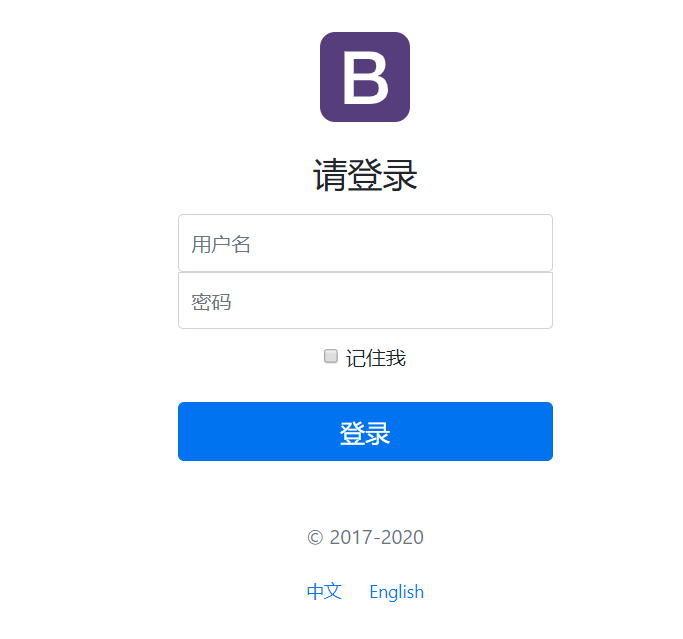
项目启动后,访问 8080 端口,默认显示是中文
![]()
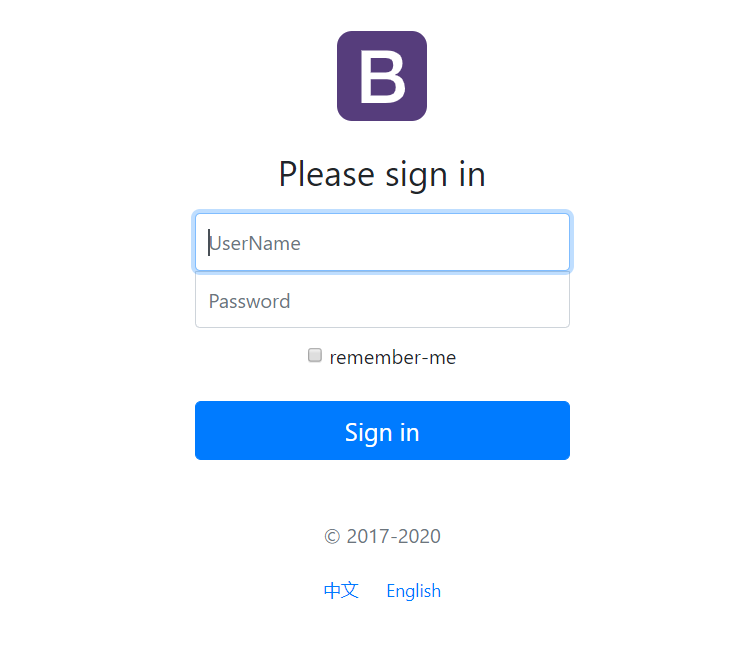
点击 English 可以切换到英文
![]()
项目已上传至 Github: https://github.com/yekongle/springboot-code-samples/tree/master/springboot-i18n-sample , 希望对小伙伴们有帮助哦。