0%

Spring Boot2 实战系列之使用分页插件PageHelper

前言

在网站里我们常常会看到可以分页的列表,这次我们就通过 springboot + thymeleaf + pagehelper 来实现这一功能。PageHelper 是开源的 MyBatis 分页插件, 支持任何复杂的单表、多表分页,详细使用方法可查看官方文档 https://pagehelper.github.io/docs/howtouse/

下面通过一个展示商品信息的页面来演示怎样使用 pagehelper

创建项目

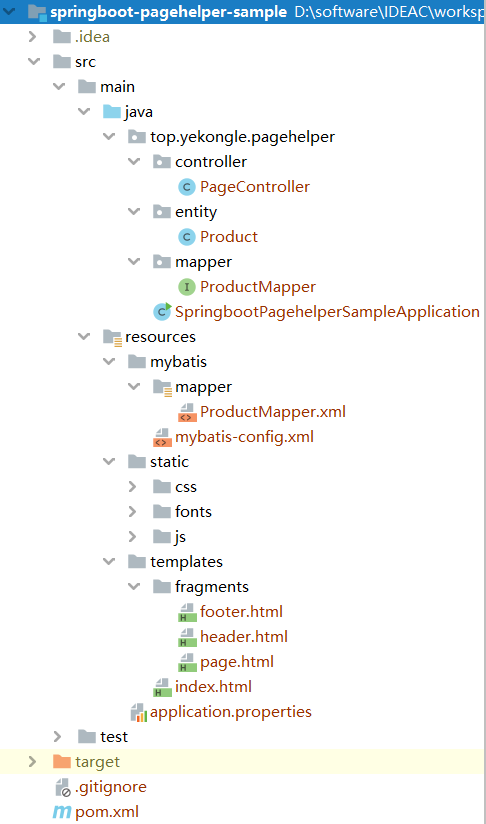
项目结构图如下:
pom 依赖如下:

1
2
3
4
5
6
7
8
9
10
11
12
13
14
15
16
17
18
19
20
21
22
23
24
25
26
27
28
29
30
31
32
33
34
35
36
37
38
39
40
41
42
43
44
45
46
47
48
49
50
51
52
53
54
55
56
57
58
59
60
61
62
63
64
65
66
67
68
69
70
71
72
73
74
75
76
77
78
79
80
81
82
<?xml version="1.0" encoding="UTF-8"?>
<project xmlns="http://maven.apache.org/POM/4.0.0" xmlns:xsi="http://www.w3.org/2001/XMLSchema-instance"
xsi:schemaLocation="http://maven.apache.org/POM/4.0.0 https://maven.apache.org/xsd/maven-4.0.0.xsd">
<modelVersion>4.0.0</modelVersion>
<parent>
<groupId>org.springframework.boot</groupId>
<artifactId>spring-boot-starter-parent</artifactId>
<version>2.2.5.RELEASE</version>
<relativePath/> <!-- lookup parent from repository -->
</parent>
<groupId>top.yekongle</groupId>
<artifactId>springboot-pagehelper-sample</artifactId>
<version>0.0.1-SNAPSHOT</version>
<name>springboot-pagehelper-sample</name>
<description>Pagehelper sample for Spring Boot</description>

<properties>
<java.version>1.8</java.version>
</properties>

<dependencies>
<dependency>
<groupId>org.springframework.boot</groupId>
<artifactId>spring-boot-starter-thymeleaf</artifactId>
</dependency>
<dependency>
<groupId>org.springframework.boot</groupId>
<artifactId>spring-boot-starter-web</artifactId>
</dependency>
<dependency>
<groupId>org.mybatis.spring.boot</groupId>
<artifactId>mybatis-spring-boot-starter</artifactId>
<version>2.1.2</version>
</dependency>
<dependency>
<groupId>com.github.pagehelper</groupId>
<artifactId>pagehelper-spring-boot-starter</artifactId>
<version>1.2.13</version>
</dependency>
<dependency>
<groupId>org.springframework.boot</groupId>
<artifactId>spring-boot-starter-thymeleaf</artifactId>
</dependency>
<dependency>
<groupId>mysql</groupId>
<artifactId>mysql-connector-java</artifactId>
<scope>runtime</scope>
</dependency>
<dependency>
<groupId>org.springframework.boot</groupId>
<artifactId>spring-boot-devtools</artifactId>
<scope>runtime</scope>
<optional>true</optional>
</dependency>
<dependency>
<groupId>org.projectlombok</groupId>
<artifactId>lombok</artifactId>
<optional>true</optional>
</dependency>
<dependency>
<groupId>org.springframework.boot</groupId>
<artifactId>spring-boot-starter-test</artifactId>
<scope>test</scope>
<exclusions>
<exclusion>
<groupId>org.junit.vintage</groupId>
<artifactId>junit-vintage-engine</artifactId>
</exclusion>
</exclusions>
</dependency>
</dependencies>

<build>
<plugins>
<plugin>
<groupId>org.springframework.boot</groupId>
<artifactId>spring-boot-maven-plugin</artifactId>
</plugin>
</plugins>
</build>

</project>

代码编写

首先先创建一个名为 product 的数据表,并插入一些数据

1
2
3
4
5
6
7
8
9
10
11
12
13
14
15
16
17
18
19
20
21
22
23
24
25
# Host: localhost  (Version 5.7.21-log)
# Date: 2020-04-24 00:00:40
# Generator: MySQL-Front 6.0 (Build 2.20)


#
# Structure for table "product"
#

DROP TABLE IF EXISTS `product`;
CREATE TABLE `product` (
`Id` int(11) NOT NULL AUTO_INCREMENT,
`category` varchar(10) DEFAULT NULL,
`name` varchar(50) DEFAULT NULL,
`discount` varchar(10) DEFAULT NULL,
`price` double(10,0) DEFAULT NULL,
PRIMARY KEY (`Id`)
) ENGINE=InnoDB DEFAULT CHARSET=utf8;

#
# Data for table "product"
#

INSERT INTO `product` VALUES (1,'零食','卫龙辣条','8折',10),(2,'洗发水','霸王','8折',69),(3,'手机','小米10','',3499),(4,'手机','小米10 Pro','',4999),(5,'手机','华为P40','',4499),(6,'男装','T恤','',59),(7,'男装','休闲裤','',89),(8,'男装','牛仔裤','',99),(9,'数码','游戏主机','',5999),(10,'数码','数码相机','',5999),(11,'办公','打印机','',2999),(12,'办公','投影机','',1999),(13,'办公','会议白板','',999);

Product.java,商品实体类

1
2
3
4
5
6
7
8
9
10
11
12
13
14
15
16
17
package top.yekongle.pagehelper.entity;

import lombok.Data;

/**
* @Description:
* @Author: Yekongle
* @Date: 2020年4月22日
*/
@Data
public class Product {
private Integer id;
private String category;
private String name;
private String discount;
private double price;
}

ProductMapper.java,商品数据操作接口

1
2
3
4
5
6
7
8
9
10
11
12
13
14
package top.yekongle.pagehelper.mapper;

import java.util.List;

import top.yekongle.pagehelper.entity.Product;

/**
* @Description:
* @Author: Yekongle
* @Date: 2020年4月22日
*/
public interface ProductMapper {
List<Product> listProduct();
}

在 resources 下新建一个 mybatis 目录,创建 mybatis 配置文件

mybatis-config.xml

1
2
3
4
5
6
7
8
9
10
11
12
13
14
15
16
<?xml version="1.0" encoding="UTF-8"?>
<!DOCTYPE configuration
PUBLIC "-//mybatis.org//DTD Config 3.0//EN"
"http://mybatis.org/dtd/mybatis-3-config.dtd">
<configuration>

<typeAliases>
<typeAlias alias="Integer" type="java.lang.Integer" />
<typeAlias alias="Long" type="java.lang.Long" />
<typeAlias alias="HashMap" type="java.util.HashMap" />
<typeAlias alias="LinkedHashMap" type="java.util.LinkedHashMap" />
<typeAlias alias="ArrayList" type="java.util.ArrayList" />
<typeAlias alias="LinkedList" type="java.util.LinkedList" />
</typeAliases>

</configuration>

在 mybatis 目录下新建一个 mapper 目录存放 mapper.xml 文件
ProductMapper.xml

1
2
3
4
5
6
7
8
9
<?xml version="1.0" encoding="UTF-8" ?>
<!DOCTYPE mapper PUBLIC "-//mybatis.org//DTD Mapper 3.0//EN" "http://mybatis.org/dtd/mybatis-3-mapper.dtd" >
<mapper namespace="top.yekongle.pagehelper.mapper.ProductMapper">

<select id="listProduct" resultType="Product">
SELECT * from product order by id
</select>

</mapper>

编辑全局配置文件,配置数据库连接信息,thymeleaf 配置,mybatis 配置以及 pagehelper 配置。
application.properties

1
2
3
4
5
6
7
8
9
10
11
12
13
14
15
16
17
18
19
20
21
22
23
24
25
# 数据库配置
spring.datasource.driver-class-name=com.mysql.cj.jdbc.Driver
spring.datasource.url=jdbc:mysql://localhost:3306/mytest?characterEncoding=utf-8&useSSL=false&serverTimezone=UTC
spring.datasource.username=root
spring.datasource.password=yekongle

# Thymeleaf 配置
spring.thymeleaf.prefix=classpath:/templates/
spring.thymeleaf.suffix=.html
spring.thymeleaf.mode=HTML
spring.thymeleaf.encoding=UTF-8
spring.thymeleaf.cache=false

# mybatis 配置
mybatis.type-aliases-package=top.yekongle.pagehelper.entity
mybatis.config-location=classpath:mybatis/mybatis-config.xml
mybatis.mapper-locations=classpath:mybatis/mapper/*.xml

# pagehelper 配置
# 指定分页插件使用哪种方言
pagehelper.helper-dialect=mysql
# 在分页查询时进行 count 查询
pagehelper.row-bounds-with-count=true
# 用户输入的页数不在合法范围能够正确的响应到正确的结果页面, pageNum<=0 会查询第一页, pageNum>总页数 会查询最后一页
pagehelper.reasonable=true

PageController.java,页面控制类,在这里使用 pagehelper 获取想要的页面和记录数并返回到前端

1
2
3
4
5
6
7
8
9
10
11
12
13
14
15
16
17
18
19
20
21
22
23
24
25
26
27
28
29
30
31
32
33
34
35
36
37
38
39
40
41
42
43
44
45
46
47
48
49
50
51
52
53
54
package top.yekongle.pagehelper.controller;

import java.util.List;

import org.springframework.beans.factory.annotation.Autowired;
import org.springframework.stereotype.Controller;
import org.springframework.ui.Model;
import org.springframework.web.bind.annotation.GetMapping;
import org.springframework.web.bind.annotation.RequestMapping;
import org.springframework.web.bind.annotation.RequestParam;
import org.springframework.web.bind.annotation.ResponseBody;
import org.springframework.web.servlet.ModelAndView;

import com.github.pagehelper.PageHelper;
import com.github.pagehelper.PageInfo;

import lombok.extern.slf4j.Slf4j;
import top.yekongle.pagehelper.entity.Product;
import top.yekongle.pagehelper.mapper.ProductMapper;

/**
* @Description: 页面控制类
* @Author: Yekongle
* @Date: 2020年4月22日
*/

@Slf4j
@Controller
public class PageController {

@Autowired
private ProductMapper productMapper;

/**
* async: 是否已加载
* pageNum:当前页
* pageSize:每页的数量
* */
@GetMapping
public ModelAndView index(@RequestParam(value = "async", required = false) boolean async,
@RequestParam(value = "pageNum", required = false, defaultValue = "0") int pageNum,
@RequestParam(value = "pageSize", required = false, defaultValue = "1") int pageSize, Model model) {
log.info("pageNum{}, pageSize{}", pageNum, pageSize);
// 开始分页
PageHelper.startPage(pageNum, pageSize);
List<Product> productList = productMapper.listProduct();

PageInfo page = new PageInfo(productList);
model.addAttribute("page", page);

return new ModelAndView(async == true ? "index :: #mainContainerRepleace" : "index", "userModel",
model);
}
}

SpringbootPagehelperSampleApplication.java, 启动类, @MapperScan: 指定mapper所在包

1
2
3
4
5
6
7
8
9
10
11
12
13
14
15
16
17
18
19
package top.yekongle.pagehelper;

import org.mybatis.spring.annotation.MapperScan;
import org.springframework.boot.SpringApplication;
import org.springframework.boot.autoconfigure.SpringBootApplication;

/**
* 项目启动类
* @MapperScan:指定mapper所在包
* */
@SpringBootApplication
@MapperScan("top.yekongle.pagehelper.mapper")
public class SpringbootPagehelperSampleApplication {

public static void main(String[] args) {
SpringApplication.run(SpringbootPagehelperSampleApplication.class, args);
}

}

前端页面编写,分为头部(header),尾部(footer),页码控制(page) 和 主页(index)

header.html

1
2
3
4
5
6
7
8
9
10
11
12
13
14
15
16
17
18
<!DOCTYPE html>
<html xmlns="http://www.w3.org/1999/xhtml"
xmlns:th="http://www.thymeleaf.org"
xmlns:sec="http://www.thymeleaf.org/thymeleaf-extras-springsecurity5" data-th-fragment="header">
<head>
<meta charset="utf-8">
<meta name="viewport" content="width=device-width, initial-scale=1, shrink-to-fit=no">

<!-- Bootstrap CSS -->
<link href="../../css/bootstrap.min.css" th:href="@{/css/bootstrap.min.css}" rel="stylesheet">
<!-- toastr CSS -->
<link href="../../css/toastr.min.css" th:href="@{/css/toastr.min.css}" rel="stylesheet">
<!-- Font-Awesome CSS -->
<link href="../../css/font-awesome.min.css" th:href="@{/css/font-awesome.min.css}" rel="stylesheet">
</head>
<body>
</body>
</html>

footer.html

1
2
3
4
5
6
7
8
9
10
11
12
13
14
15
16
17
18
19
20
21
22
23
<!DOCTYPE html>
<html lang="en">
<head>
<meta charset="UTF-8">
</head>
<body>
<footer class="blog-footer bg-inverse" data-th-fragment="footer">
<div class="container">
<p class="m-0 text-center text-white">
© 2020 <a href="https://www.yekongle.top">yekongle.top</a>
</p>
</div>

<!-- JavaScript -->
<script src="../js/jquery.min.js" th:src="@{/js/jquery.min.js}"></script>
<script src="../js/bootstrap.min.js" th:src="@{/js/bootstrap.min.js}"></script>
<script src="../js/main.js" th:src="@{/js/main.js}"></script>
<script src="../js/thymeleaf-bootstrap-paginator.js" th:src="@{/js/thymeleaf-bootstrap-paginator.js}"></script>
<script src="../js/toastr.min.js" th:src="@{/js/toastr.min.js}"></script>
</footer>

</body>
</html>

page.html

1
2
3
4
5
6
7
8
9
10
11
12
13
14
15
16
17
18
19
20
21
22
23
24
25
26
27
28
29
30
31
32
33
34
35
36
37
38
39
40
41
42
43
44
45
46
47
48
49
50
51
52
53
54
55
56
57
58
59
60
61
62
63
64
65
66
67
68
69
70
71
72
73
74
75
76
77
78
79
80
81
82
83
84
85
86
87
88
89
90
91
92
93
94
95
96
97
98
99
100
101
102
103
104
105
106
107
108
109
110
111
112
113
114
115
116
117
118
119
120
121
122
123
124
125
126
127
128
129
130
131
132
133
134
135
136
137
138
139
140
141
142
143
144
145
146
147
<!DOCTYPE html>
<html lang="en">
<head>
<meta charset="UTF-8">
</head>
<body>

<nav data-th-fragment="page" data-th-if="${page.total gt 0}" data-th-object="${page}">

<!-- 处理页数小于等于7 的情况 -->
<ul class="pagination" data-th-if="${page.pages le 7}">
<!-- 总记录数 -->
<li class="tbpage-total-elements disabled">共[[${page.total}]]条</li>

<!-- 页面大小 -->
<select class="custom-select tbpage-size" data-th-attr="pageSize=${page.pageSize}">
<option data-th-each="i : ${#arrays.toIntegerArray({1, 3, 5,10,40,100})}" data-th-value="${i}"
data-th-selected="${i eq page.pageSize}" data-th-text="${i}"></option>
</select>


<!-- 上一页 -->
<li class="page-item" data-th-classappend="${page.isFirstPage} ? 'disabled' : ''">
<a href="javascript:void(0);" class="page-link tbpage-item" data-th-attr="pageNum=${page.prePage}"
aria-label="Previous">
<span aria-hidden="true">«</span>
</a>
</li>

<!-- 迭代生成页码 -->
<li class="page-item" data-th-each="i : ${#numbers.sequence(1, page.pages)}"
data-th-classappend="${page.pageNum eq i} ? 'active' : ''">
<a class="page-link tbpage-item" data-th-attr="pageNum=${i}" href="javascript:void(0);">
<span data-th-text="${i}"></span>
</a>
</li>


<!-- 下一页 -->
<li class="page-item" data-th-classappend="${page.isLastPage} ? 'disabled' : ''">
<a href="javascript:void(0);" class="page-link tbpage-item" data-th-attr="pageNum=${page.nextPage}"
aria-label="Next">
<span aria-hidden="true">»</span>
</a>
</li>
</ul>


<!-- 处理页数大于7 的情况 -->
<ul class="pagination" data-th-if="${page.pages gt 7}">
<!-- 总记录数 -->
<li class="tbpage-total-elements disabled">共[[${page.total}]]条</li>

<!-- 页面大小 -->
<select class="custom-select tbpage-size" data-th-attr="pageSize=${page.pageSize}">
<option data-th-each="i : ${#arrays.toIntegerArray({1, 5,10,40,100})}" data-th-value="${i}"
data-th-selected="${i eq page.pageSize}" data-th-text="${i}"></option>
</select>

<!-- 上一页 -->
<li class="page-item" data-th-classappend="${page.isFirstPage} ? 'disabled' : ''">
<a href="javascript:void(0);" class="page-link tbpage-item" data-th-attr="pageNum=${page.prePage}"
aria-label="Previous">
<span aria-hidden="true">«</span>
</a>
</li>

<!-- 首页 -->
<li class="page-item" data-th-classappend="${page.pageNum eq 1} ? 'active' : ''">
<a href="javascript:void(0);" class="page-link tbpage-item" data-th-attr="pageNum=0">1</a>
</li>


<!-- 当前页面小于等于4 -->
<li class="page-item" data-th-if="${page.pageNum le 4}" data-th-each="i : ${#numbers.sequence(2,5)}"
data-th-classappend="${page.pageNum eq i} ? 'active' : ''">
<a class="page-link tbpage-item" href="javascript:void(0);" data-th-attr="pageNum=${i}">
<span data-th-text="${i}"></span>
</a>
</li>

<li class="page-item disabled" data-th-if="${page.pageNum le 4}">
<a href="javascript:void(0);" class="page-link tbpage-item">
<span aria-hidden="true">...</span>
</a>
</li>

<!-- 最后一页与当前页面之差,小于等于3 -->
<li class="page-item disabled" data-th-if="${(page.pages-page.pageNum) le 3}">
<a href="javascript:void(0);" class="page-link tbpage-item">
<span aria-hidden="true">...</span>
</a>
</li>
<li class="page-item" data-th-if="${(page.pages-page.pageNum) le 3}"
data-th-each="i : ${#numbers.sequence(page.pages-3, page.pages-1)}"
data-th-classappend="${page.pageNum eq i} ? 'active' : ''">
<a class="page-link tbpage-item" href="javascript:void(0);" data-th-attr="pageNum=${i}">
<span data-th-text="${i}"></span>
</a>
</li>

<!-- 最后一页与当前页面之差大于3,且当前页面大于4-->

<li class="page-item disabled"
data-th-if="${(page.pageNum gt 4) && ((page.pages - page.pageNum) gt 3 )}">
<a href="javascript:void(0);" class="page-link tbpage-item">
<span aria-hidden="true">...</span>
</a>
</li>
<li class="page-item active" data-th-if="${(page.pageNum gt 4) && ((page.pages-page.pageNum) gt 3 )}">
<a href="javascript:void(0);" class="page-link tbpage-item" data-th-attr="pageNum=${page.pageNum}">[[${page.pageNum}]]</a>
</li>
<li class="page-item"
data-th-if="${(page.pageNum gt 4) && ((page.pages - page.pageNum) gt 3 )}">
<a href="javascript:void(0);" class="page-link tbpage-item" data-th-attr="pageNum=${page.pageNum + 1}">[[${page.pageNum
+ 1}]]</a>
</li>
<li class="page-item" data-th-if="${(page.pageNum gt 4) && ((page.pages-page.pageNum) gt 3 )}">
<a href="javascript:void(0);" class="page-link tbpage-item" data-th-attr="pageNum=${page.pageNum} + 2">[[${page.pageNum
+ 2}]]</a>
</li>

<li class="page-item disabled"
data-th-if="${(page.pageNum gt 4) && ((page.pages-page.pageNum) gt 3 )}">
<a href="javascript:void(0);" class="page-link tbpage-item">
<span aria-hidden="true">...</span>
</a>
</li>

<!-- 最后一页 -->
<li class="page-item" data-th-classappend="${page.pageNum eq page.pages} ? 'active' : ''">
<a href="javascript:void(0);" class="page-link tbpage-item" data-th-attr="pageNum=${page.pages}">[[${page.pages}]]</a>
</li>

<!-- 下一页 -->
<li class="page-item" data-th-classappend="${page.isLastPage} ? 'disabled' : ''">
<a href="javascript:void(0);" class="page-link tbpage-item" data-th-attr="pageNum=${page.nextPage}"
aria-label="Next">
<span aria-hidden="true">»</span>
</a>
</li>
</ul>

</nav>

</body>
</html>

index.html

1
2
3
4
5
6
7
8
9
10
11
12
13
14
15
16
17
18
19
20
21
22
23
24
25
26
27
28
29
30
31
32
33
34
35
36
<!DOCTYPE html>
<html xmlns="http://www.w3.org/1999/xhtml"
xmlns:th="http://www.thymeleaf.org">
<head th:replace="~{fragments/header :: header}">
</head>
<body>
<div id="mainContainer" class="container">
<div id="mainContainerRepleace" class="row">
<table class="table table-striped">
<thead>
<tr>
<th data-field="id">ID</th>
<th data-field=“category”>类别</th>
<th data-field="name">名字</th>
<th data-field="price">价格(元)</th>
<th data-field="discount">优惠</th>
</tr>
</thead>
<tbody>
<tr th:each="product : ${page.list}">
<td th:text="${product.id}">1</td>
<td th:text="${product.category}">1</td>
<td th:text="${product.name}">1</td>
<td th:text="${product.price}">1</td>
<td th:text="${product.discount}">1</td>
</tr>
</tbody>
</table>
<div th:replace="~{fragments/page :: page}">...</div>
</div>
</div>

<div th:replace="~{fragments/footer :: footer}">...</div>

</body>
</html>

运行演示

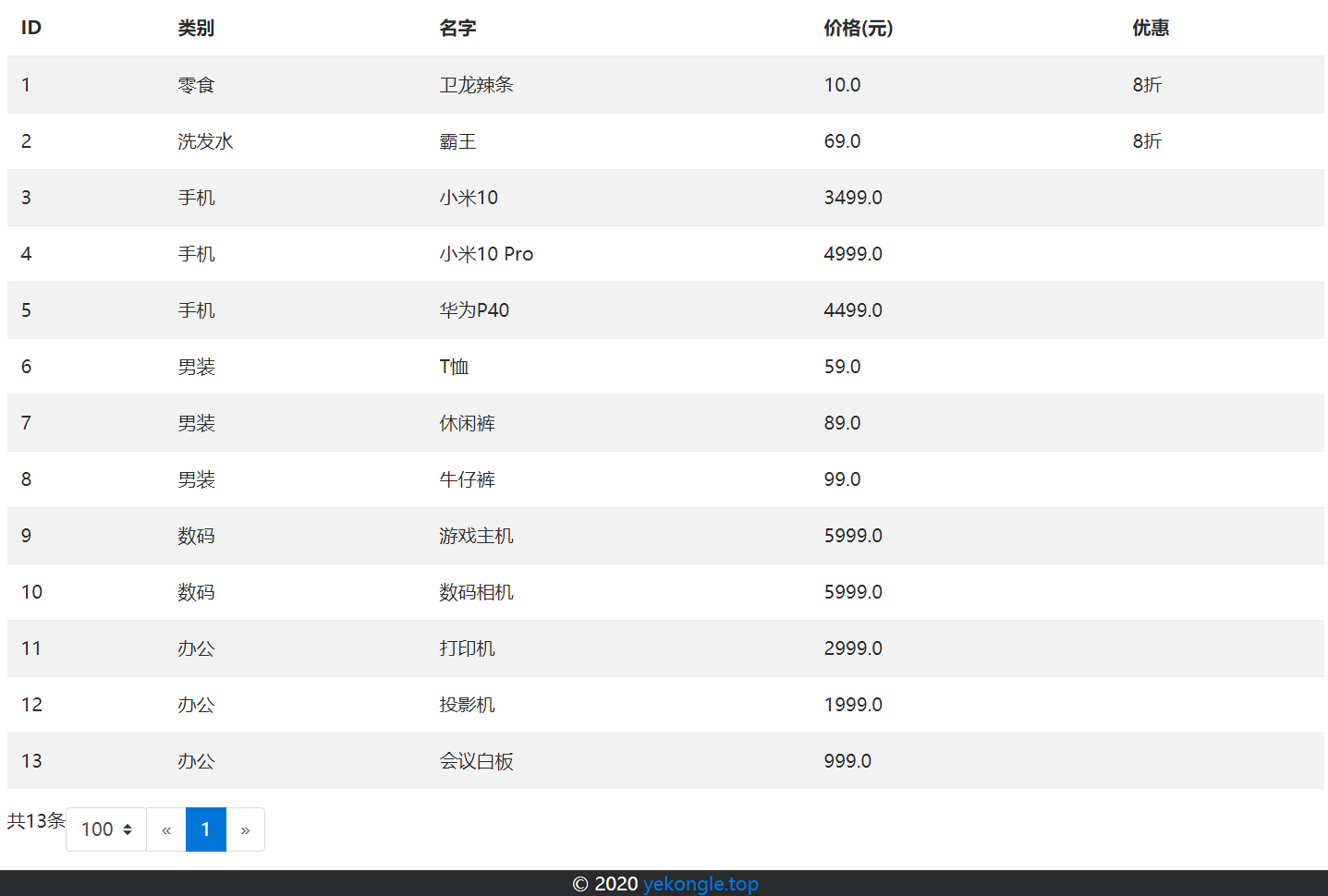
项目启动后,访问 8080 端口

每页展示一条记录

每页展示一百条记录
项目已上传至 Github: https://github.com/yekongle/springboot-code-samples/tree/master/springboot-pagehelper-sample , 希望对小伙伴们有帮助哦。

坚持原创技术分享,您的支持将鼓励我继续创作!
