前言
文件上传和下载是很多网站都会有的功能,这次我们来实践下用 Spring Boot 实现这个功能。为了方便演示,没有实现将文件存储到数据库中,只是用到了一个 List 将上传文件的相关信息保存在内存中,文件本身放在本地磁盘。
创建项目
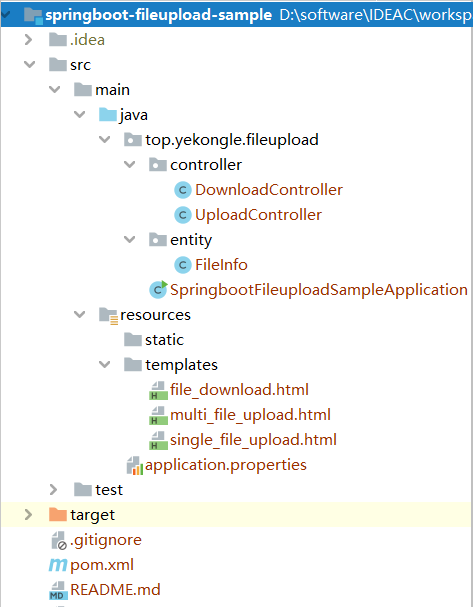
项目结构图如下:
![]()
pom 依赖如下:
1
2
3
4
5
6
7
8
9
10
11
12
13
14
15
16
17
18
19
20
21
22
23
24
25
26
27
28
29
30
31
32
33
34
35
36
37
38
39
40
41
42
43
44
45
46
47
48
49
50
51
52
53
54
55
56
57
58
59
60
61
62
63
| <?xml version="1.0" encoding="UTF-8"?>
<project xmlns="http://maven.apache.org/POM/4.0.0" xmlns:xsi="http://www.w3.org/2001/XMLSchema-instance"
xsi:schemaLocation="http://maven.apache.org/POM/4.0.0 https://maven.apache.org/xsd/maven-4.0.0.xsd">
<modelVersion>4.0.0</modelVersion>
<parent>
<groupId>org.springframework.boot</groupId>
<artifactId>spring-boot-starter-parent</artifactId>
<version>2.2.5.RELEASE</version>
<relativePath/>
</parent>
<groupId>top.yekongle</groupId>
<artifactId>springboot-fileupload-sample</artifactId>
<version>0.0.1-SNAPSHOT</version>
<name>springboot-fileupload-sample</name>
<description>file upload sample for Spring Boot</description>
<properties>
<java.version>1.8</java.version>
</properties>
<dependencies>
<dependency>
<groupId>org.springframework.boot</groupId>
<artifactId>spring-boot-starter-thymeleaf</artifactId>
</dependency>
<dependency>
<groupId>org.springframework.boot</groupId>
<artifactId>spring-boot-starter-web</artifactId>
</dependency>
<dependency>
<groupId>org.springframework.boot</groupId>
<artifactId>spring-boot-devtools</artifactId>
<scope>runtime</scope>
<optional>true</optional>
</dependency>
<dependency>
<groupId>org.projectlombok</groupId>
<artifactId>lombok</artifactId>
<optional>true</optional>
</dependency>
<dependency>
<groupId>org.springframework.boot</groupId>
<artifactId>spring-boot-starter-test</artifactId>
<scope>test</scope>
<exclusions>
<exclusion>
<groupId>org.junit.vintage</groupId>
<artifactId>junit-vintage-engine</artifactId>
</exclusion>
</exclusions>
</dependency>
</dependencies>
<build>
<plugins>
<plugin>
<groupId>org.springframework.boot</groupId>
<artifactId>spring-boot-maven-plugin</artifactId>
</plugin>
</plugins>
</build>
</project>
|
代码编写
application.properties, 全局配置,文件上传配置根据自身需求进行调整。
1
2
3
4
5
6
7
8
9
10
11
12
13
14
15
16
17
18
19
20
21
22
23
|
spring.thymeleaf.prefix=classpath:/templates/
spring.thymeleaf.suffix=.html
spring.thymeleaf.mode=HTML5
spring.thymeleaf.encoding=UTF-8
spring.thymeleaf.cache=false
spring.servlet.multipart.enabled=true
spring.servlet.multipart.location=F:/upload
spring.servlet.multipart.max-file-size=5MB
spring.servlet.multipart.max-request-size=50MB
spring.servlet.multipart.file-size-threshold=0
|
FileInfo.java,实体类,代表文件信息
1
2
3
4
5
6
7
8
9
10
11
12
13
14
15
16
17
18
| package top.yekongle.fileupload.entity;
import lombok.AllArgsConstructor;
import lombok.Data;
@Data
@AllArgsConstructor
public class FileInfo {
private String name;
private String contentType;
private long size;
private String uploadDate;
}
|
UploadController.java
1
2
3
4
5
6
7
8
9
10
11
12
13
14
15
16
17
18
19
20
21
22
23
24
25
26
27
28
29
30
31
32
33
34
35
36
37
38
39
40
41
42
43
44
45
46
47
48
49
50
51
52
53
54
55
56
57
58
59
60
61
62
63
64
65
66
67
68
69
70
71
72
73
74
75
76
77
78
79
80
81
82
83
84
85
86
87
88
89
90
91
92
93
94
95
96
97
98
99
100
101
102
103
104
105
106
107
108
109
110
111
112
113
114
115
116
117
118
119
120
121
122
123
124
125
126
127
128
129
130
131
132
133
134
135
136
137
138
139
140
141
142
143
144
145
146
147
| package top.yekongle.fileupload.controller;
import java.io.File;
import java.io.IOException;
import java.text.SimpleDateFormat;
import java.util.ArrayList;
import java.util.Date;
import java.util.List;
import org.springframework.beans.factory.annotation.Value;
import org.springframework.stereotype.Controller;
import org.springframework.ui.Model;
import org.springframework.web.bind.annotation.GetMapping;
import org.springframework.web.bind.annotation.PostMapping;
import org.springframework.web.bind.annotation.RequestParam;
import org.springframework.web.bind.annotation.ResponseBody;
import org.springframework.web.multipart.MultipartFile;
import org.springframework.web.servlet.mvc.support.RedirectAttributes;
import lombok.extern.slf4j.Slf4j;
import top.yekongle.fileupload.entity.FileInfo;
@Controller
@Slf4j
public class UploadController {
@Value("${spring.servlet.multipart.location}")
private String path;
private static final int DEFAULT_MAX_FILE_SIZE = 5 * 1000 * 1000;
private static final int DEFAULT_REQUEST_MAX_SIZE = 50 * 1000 * 1000;
private SimpleDateFormat sf = new SimpleDateFormat("yyyy-MM-dd HH:mm:ss");
private List<FileInfo> fileInfoList = new ArrayList<FileInfo>();
@GetMapping("/singleFileUpload")
public String getSingleFileUploadPage(Model model) {
model.addAttribute("files", fileInfoList);
return "single_file_upload";
}
@GetMapping("/multiFileUpload")
public String getMultiFileUploadPage(Model model) {
model.addAttribute("files", fileInfoList);
return "multi_file_upload";
}
@PostMapping("/singleFileUpload")
public String singleFileUpload(@RequestParam("file") MultipartFile file, RedirectAttributes redirectAttributes)
throws IOException {
File filePath = new File(path);
log.info("文件保存的路径为: {}", filePath.getAbsolutePath());
if (!filePath.exists() && !filePath.isDirectory()) {
filePath.mkdir();
}
if (file.isEmpty()) {
redirectAttributes.addFlashAttribute("message", "文件为空!");
return "redirect:/singleFileUpload";
}
if (file.getSize() <= 0) {
redirectAttributes.addFlashAttribute("message", "文件大小为空,上传失败!");
return "redirect:/singleFileUpload";
}
if (file.getSize() > DEFAULT_MAX_FILE_SIZE) {
redirectAttributes.addFlashAttribute("message", "上传的文件不能大于5M!");
return "redirect:/singleFileUpload";
}
String fileName = file.getOriginalFilename();
log.info("上传的文件名为:{}", fileName);
log.info("上传的文件大小为:{}", file.getSize());
log.info("上传的文件类型为:{}", file.getContentType());
File newfile = new File(path, fileName);
if (newfile.exists()) {
redirectAttributes.addFlashAttribute("message", "该文件已经存在!");
return "redirect:/singleFileUpload";
} else {
FileInfo fileInfo = new FileInfo(fileName, file.getContentType(), file.getSize(), sf.format(new Date()));
fileInfoList.add(fileInfo);
}
file.transferTo(newfile);
return "redirect:/singleFileUpload";
}
@PostMapping("/multiFileUpload")
public String multiFileUpload(@RequestParam("files") MultipartFile[] files, RedirectAttributes redirectAttributes)
throws IOException {
if (null == files) {
redirectAttributes.addFlashAttribute("message", "参数为空!");
return "redirect:/multiFileUpload";
}
File filePath = new File(path);
log.info("文件保存的路径为: {}", filePath.getAbsolutePath());
if (!filePath.exists() && !filePath.isDirectory()) {
filePath.mkdir();
}
for (MultipartFile uploadFile : files) {
if (uploadFile.isEmpty()) {
redirectAttributes.addFlashAttribute("message", "文件为空!");
return "redirect:/multiFileUpload";
}
if (uploadFile.getSize() <= 0) {
redirectAttributes.addFlashAttribute("message", "文件大小为空,上传失败!");
return "redirect:/multiFileUpload";
}
if (uploadFile.getSize() > DEFAULT_REQUEST_MAX_SIZE) {
redirectAttributes.addFlashAttribute("message", "上传的文件不能大于5M!");
return "redirect:/multiFileUpload";
}
String fileName = uploadFile.getOriginalFilename();
log.info("上传的文件名为:{}", fileName);
log.info("上传的文件大小为:{}", uploadFile.getSize());
log.info("上传的文件类型为:{}", uploadFile.getContentType());
File newfile = new File(path, fileName);
if (!newfile.exists()) {
FileInfo fileInfo = new FileInfo(fileName, uploadFile.getContentType(), uploadFile.getSize(),
sf.format(new Date()));
fileInfoList.add(fileInfo);
}
uploadFile.transferTo(newfile);
}
return "redirect:/multiFileUpload";
}
}
|
1
2
3
4
5
6
7
8
9
10
11
12
13
14
15
16
17
18
19
20
21
22
23
24
25
26
27
28
29
30
31
32
33
34
35
36
37
38
39
40
41
42
43
44
45
46
47
48
49
50
51
52
53
54
55
56
57
58
59
60
61
62
63
64
65
66
67
68
69
70
71
72
73
74
75
76
77
78
79
80
81
82
83
84
85
86
87
88
89
90
91
| package top.yekongle.fileupload.controller;
import java.io.BufferedInputStream;
import java.io.File;
import java.io.FileInputStream;
import java.io.IOException;
import java.io.UnsupportedEncodingException;
import javax.servlet.ServletOutputStream;
import javax.servlet.http.HttpServletRequest;
import javax.servlet.http.HttpServletResponse;
import org.springframework.stereotype.Controller;
import org.springframework.ui.Model;
import org.springframework.web.bind.annotation.GetMapping;
import org.springframework.web.bind.annotation.PostMapping;
import org.springframework.web.bind.annotation.ResponseBody;
import lombok.extern.slf4j.Slf4j;
@Controller
@Slf4j
public class DownloadController {
private static final String FILE_STORE_PATH = "F:/upload";
@GetMapping("/downloadFile")
public String getUploadPage() {
return "file_download";
}
@PostMapping("/downloadFile")
@ResponseBody
public String downLoadFile(HttpServletRequest request, HttpServletResponse response, Model model)
throws UnsupportedEncodingException {
log.info("要下载的文件:{}", request.getParameter("fileName"));
String fileName = request.getParameter("fileName");
log.info("File name:{}", fileName);
File file = new File(FILE_STORE_PATH, fileName);
log.info("File path:{}", file.getAbsolutePath());
if (file.exists()) {
response.setHeader("content-type", "application/octet-stream");
response.setContentType("application/octet-stream");
response.setHeader("Content-Disposition",
"attachment;filename=" + new String(fileName.getBytes(), "utf-8"));
response.setHeader("Content-Length", "" + file.length());
BufferedInputStream bi = null;
try {
byte[] buffer = new byte[1024];
bi = new BufferedInputStream(new FileInputStream(file));
ServletOutputStream outputStream = response.getOutputStream();
int i = -1;
while (-1 != (i = bi.read(buffer))) {
outputStream.write(buffer, 0, i);
}
return "下载成功";
} catch (Exception e) {
e.printStackTrace();
return "下载失败";
} finally {
if (bi != null) {
try {
bi.close();
} catch (IOException e) {
e.printStackTrace();
}
}
}
}
return "文件不存在";
}
}
|
前端页面
single_file_upload.html, 只可以上传单个文件,上传成功会返回文件信息
1
2
3
4
5
6
7
8
9
10
11
12
13
14
15
16
17
18
19
20
21
22
23
24
25
26
27
28
29
30
31
32
33
34
35
36
37
38
39
40
41
42
43
44
45
46
47
48
49
50
51
52
53
54
| <!DOCTYPE html>
<html xmlns="http://www.w3.org/1999/xhtml"
xmlns:th="http://www.thymeleaf.org">
<head>
<meta charset="UTF-8">
<title>单个文件上传</title>
<script src="../static/js/jquery-1.10.2.min.js"
th:src="@{/js/jquery-1.10.2.min.js}"></script>
</head>
<body>
<div th:if="${message}">
<h2 style="color: red;" th:text="${message}" />
</div>
<div>
<h2>单个文件上传</h2>
<form action="singleFileUpload" method="POST"
enctype="multipart/form-data">
<p>
文件:<input type="file" name="file" />
</p>
<p>
<input type="submit" value="上传" />
</p>
</form>
</div>
<div>
<table border="1">
<thead>
<tr>
<td>Name</td>
<td>contentType</td>
<td>size</td>
<td>uploadDate</td>
</tr>
</thead>
<tbody>
<tr th:if="${files.size()} eq 0">
<td colspan="4">没有文件信息!!</td>
</tr>
<tr th:each="file : ${files}">
<td th:text="${file.name}" /></td>
<td th:text="${file.contentType}"></td>
<td th:text="${file.size}"></td>
<td th:text="${file.uploadDate}"></td>
</tr>
</tbody>
</table>
</div>
</body>
</html>
|
multi_file_upload.html, 可以多个文件一起上传,同样会返回文件信息列表
1
2
3
4
5
6
7
8
9
10
11
12
13
14
15
16
17
18
19
20
21
22
23
24
25
26
27
28
29
30
31
32
33
34
35
36
37
38
39
40
41
42
43
44
45
46
47
48
49
50
51
52
53
| <!DOCTYPE html>
<html xmlns="http://www.w3.org/1999/xhtml"
xmlns:th="http://www.thymeleaf.org">
<head>
<meta charset="UTF-8">
<title>多个文件上传</title>
<script src="../static/js/jquery-1.10.2.min.js"
th:src="@{/js/jquery-1.10.2.min.js}"></script>
</head>
<body>
<div th:if="${message}">
<h2 style="color: red;" th:text="${message}" />
</div>
<div>
<h2>多文件上传</h2>
<form action="/multiFileUpload" method="POST"
enctype="multipart/form-data">
<p>
多文件上传:<input type="file" name="files" multiple="multiple" />
</p>
<p>
<input type="submit" value="上传" />
</p>
</form>
</div>
<div>
<table border="1">
<thead>
<tr>
<td>Name</td>
<td>contentType</td>
<td>size</td>
<td>uploadDate</td>
</tr>
</thead>
<tbody>
<tr th:if="${files.size()} eq 0">
<td colspan="4">没有文件信息!</td>
</tr>
<tr th:each="file : ${files}">
<td th:text="${file.name}" /></td>
<td th:text="${file.contentType}"></td>
<td th:text="${file.size}"></td>
<td th:text="${file.uploadDate}"></td>
</tr>
</tbody>
</table>
</div>
</body>
</body>
</html>
|
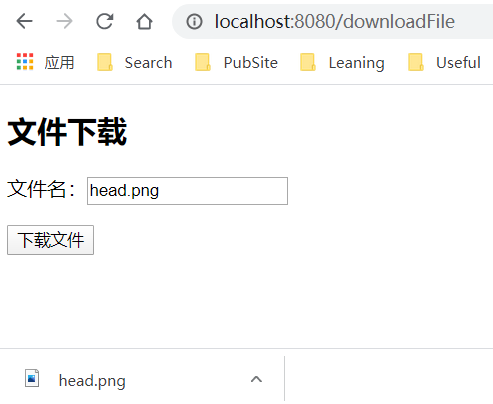
file_download.html, 输入上传的文件名即可下载
1
2
3
4
5
6
7
8
9
10
11
12
13
14
15
16
17
18
19
20
21
22
23
24
| <!DOCTYPE html>
<html xmlns="http://www.w3.org/1999/xhtml"
xmlns:th="http://www.thymeleaf.org">
<head>
<meta charset="UTF-8">
<title>文件下载</title>
<script src="../static/js/jquery-1.10.2.min.js"
th:src="@{/js/jquery-1.10.2.min.js}"></script>
</head>
<body>
<div>
<h2>文件下载</h2>
<form action="downloadFile" method="POST" enctype="multipart/form-data">
<p>
文件名:<input type="text" name="fileName" />
</p>
<p>
<input type="submit" value="下载文件" />
</p>
</form>
</div>
</body>
</html>
|
运行演示
启动项目
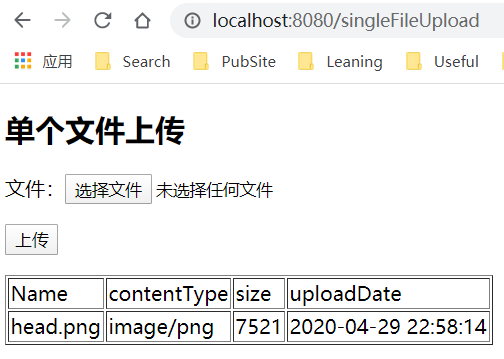
单个文件上传,访问 http://localhost:8080/singleFileUpload
![]()
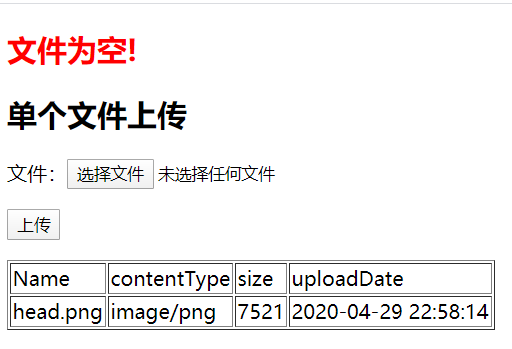
如果上传文件不符合条件会报错
![]()
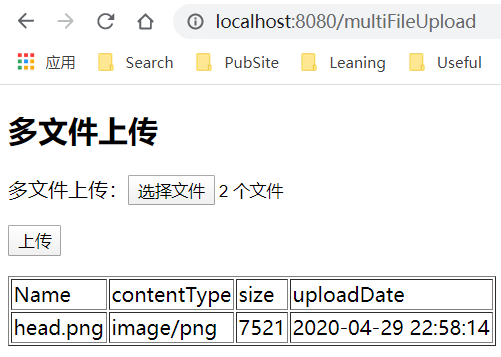
多个文件上传,访问 http://localhost:8080/multiFileUpload
![]()
下载上传的文件,访问 http://localhost:8080/downloadFile
![]()
项目已上传至 Github: https://github.com/yekongle/springboot-code-samples/tree/master/springboot-fileupload-sample , 希望对小伙伴们有帮助哦。