前言
Thymeleaf 是一个 xml, xhtml,html5 的模板引擎,Spring Boot 官方推荐使用 Thymeleaf 引擎,因为它对 Spring MVC 提供了完美的支持。我们知道以前的 Spring MVC web应用在视图层常使用 JSP,但 springboot 使用的是内嵌的 servlet 容器,而内嵌的 Tomcat 和 Jetty 不支持以 jar 形式运行 JPS,Undertow也不支持 JPS,所以在SpringBoot 中我们完全可以使用 Thymeleaf来代替 JSP。
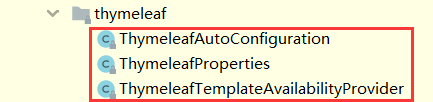
在 Spring Boot 中使用 Thymeleaf 非常方便,它已经通过 org.springframework.boot.autoconfigure.thymeleaf 包对 Thymeleaf 进行了自动配置, 如下图所示
![]()
我们只需要引入它的依赖即可
1
2
3
4
| <dependency>
<groupId>org.springframework.boot</groupId>
<artifactId>spring-boot-starter-thymeleaf</artifactId>
</dependency>
|
下面通过一个例子来说明 Thymeleaf 的一些用法,更多详情请看 Thymeleaf 官网:https://www.thymeleaf.org/
创建项目
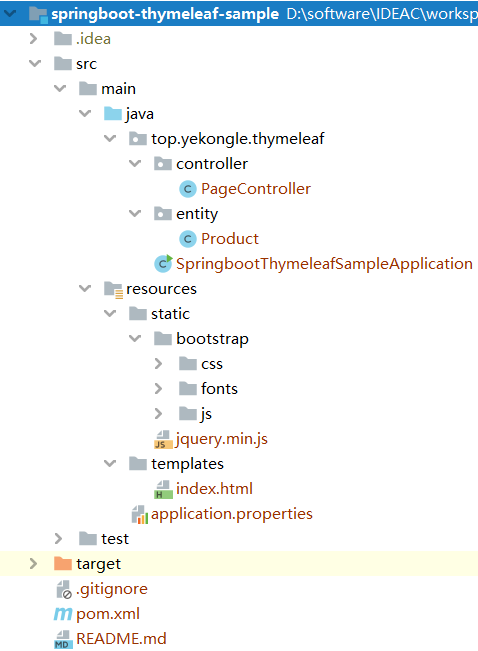
项目结构图如下:
![]()
pom 依赖文件如下:
1
2
3
4
5
6
7
8
9
10
11
12
13
14
15
16
17
18
19
20
21
22
23
24
25
26
27
28
29
30
31
32
33
34
35
36
37
38
39
40
41
42
43
44
45
46
47
48
49
50
51
52
53
54
55
56
57
58
59
60
61
62
63
64
65
| <?xml version="1.0" encoding="UTF-8"?>
<project xmlns="http://maven.apache.org/POM/4.0.0" xmlns:xsi="http://www.w3.org/2001/XMLSchema-instance"
xsi:schemaLocation="http://maven.apache.org/POM/4.0.0 https://maven.apache.org/xsd/maven-4.0.0.xsd">
<modelVersion>4.0.0</modelVersion>
<parent>
<groupId>org.springframework.boot</groupId>
<artifactId>spring-boot-starter-parent</artifactId>
<version>2.2.5.RELEASE</version>
<relativePath/>
</parent>
<groupId>top.yekongle</groupId>
<artifactId>springboot-thymeleaf-sample</artifactId>
<version>0.0.1-SNAPSHOT</version>
<name>springboot-thymeleaf-sample</name>
<description>Thymeleaf sample for Spring Boot</description>
<properties>
<java.version>1.8</java.version>
</properties>
<dependencies>
<dependency>
<groupId>org.springframework.boot</groupId>
<artifactId>spring-boot-starter-web</artifactId>
</dependency>
<dependency>
	<groupId>org.springframework.boot</groupId>
	<artifactId>spring-boot-starter-thymeleaf</artifactId>
</dependency>
<dependency>
<groupId>org.springframework.boot</groupId>
<artifactId>spring-boot-devtools</artifactId>
<scope>runtime</scope>
<optional>true</optional>
</dependency>
<dependency>
<groupId>org.projectlombok</groupId>
<artifactId>lombok</artifactId>
<optional>true</optional>
</dependency>
<dependency>
<groupId>org.springframework.boot</groupId>
<artifactId>spring-boot-starter-test</artifactId>
<scope>test</scope>
<exclusions>
<exclusion>
<groupId>org.junit.vintage</groupId>
<artifactId>junit-vintage-engine</artifactId>
</exclusion>
</exclusions>
</dependency>
</dependencies>
<build>
<plugins>
<plugin>
<groupId>org.springframework.boot</groupId>
<artifactId>spring-boot-maven-plugin</artifactId>
</plugin>
</plugins>
</build>
</project>
|
代码编写
application.properties, 全局配置文件
1
2
3
4
5
6
7
8
9
10
|
spring.thymeleaf.prefix=classpath:/templates/
spring.thymeleaf.suffix=.html
spring.thymeleaf.mode=HTML5
spring.thymeleaf.encoding=UTF-8
spring.thymeleaf.cache=false
|
Product.java, 商品属性
1
2
3
4
5
6
7
8
9
10
11
12
| package top.yekongle.thymeleaf.entity;
import lombok.AllArgsConstructor;
import lombok.Data;
@Data
@AllArgsConstructor
public class Product {
private String category;
private String name;
private double price;
}
|
PageController.java, 将商品信息返回给页面
1
2
3
4
5
6
7
8
9
10
11
12
13
14
15
16
17
18
19
20
21
22
23
24
25
26
27
28
29
30
31
32
33
| package top.yekongle.thymeleaf.controller;
import org.springframework.stereotype.Controller;
import org.springframework.ui.Model;
import org.springframework.web.bind.annotation.GetMapping;
import top.yekongle.thymeleaf.entity.Product;
import java.util.ArrayList;
import java.util.List;
@Controller
public class PageController {
@GetMapping
public String index(Model model) {
List<Product> productList = this.getProductList();
model.addAttribute("products", productList);
model.addAttribute("title", "商品列表");
return "index";
}
List<Product> getProductList() {
List<Product> productList = new ArrayList<>();
Product product1 = new Product("手机", "小米10", 3499);
Product product2 = new Product("手机", "华为P40", 4188);
Product product3 = new Product("手机", "一加8", 3999);
productList.add(product1);
productList.add(product2);
productList.add(product3);
return productList;
}
}
|
index.html,商品展示页面
1
2
3
4
5
6
7
8
9
10
11
12
13
14
15
16
17
18
19
20
21
22
23
24
25
26
27
28
29
30
31
32
33
34
35
36
37
38
39
40
41
42
43
44
45
46
47
48
49
50
51
52
| <html xmlns:th="http://www.thymeleaf.org">
<head>
<meta content="text/html;charset=UTF-8"/>
<meta http-equiv="X-UA-Compatible" content="IE=edge"/>
<meta name="viewport" content="width=device-width, initial-scale=1"/>
<link th:href="@{bootstrap/css/bootstrap.min.css}" rel="stylesheet"/>
</head>
<body>
<div class="container">
<div class="panel panel-primary">
<div class="panel-heading">
<h3 class="panel-title" th:text="${title}">title</h3>
</div>
<div class="panel-body">
<div th:if="${not #lists.isEmpty(products)}">
<table class="table table-bordered table-hover">
<thead>
<tr>
<th>Category</th>
<th>Name</th>
<th>Price</th>
</tr>
</thead>
<tbody>
<tr th:each="product: ${products}">
<td th:texts="${product.category}">Category</td>
<td th:text="${product.name}">name</td>
<td th:text="${#numbers.formatDecimal(product.price, 1, 2)}">0.99</td>
</tr>
</tbody>
</table>
</div>
</div>
</div>
</div>
<script th:src="@{jquery.min.js}" type="text/javascript"></script>
<script th:src="@{bootstrap/js/bootstrap.min.js}"></script>
<script th:inline="javascript">
var title = [[${title}]];
console.log(title);
</script>
</body>
</html>
|
运行演示
启动项目
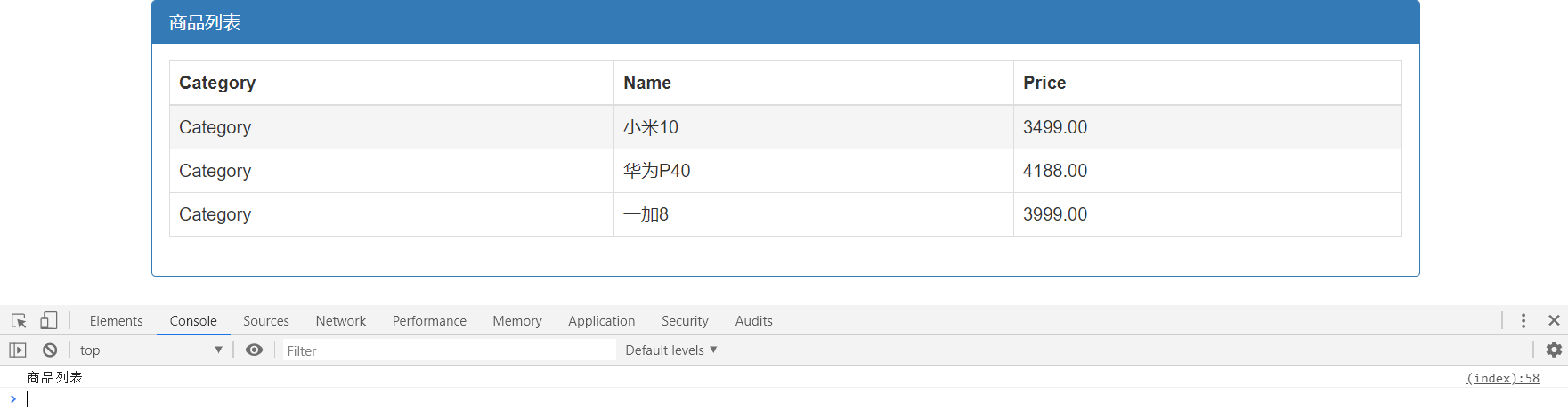
访问 http://localhost:8080/, 商品信息都展示了出来,控制台也打印出了属性 title
![]()
项目已上传至 Github: https://github.com/yekongle/springboot-code-samples/tree/master/springboot-thymeleaf-sample , 希望对小伙伴们有帮助哦。