0%

Spring Boot2 实战系列之使用 Spring Security 实现登录

前言

在之前的一篇博文 Spring Boot2 实战系列之语言国际化 中利用了 BootStrap 官网的一个登录页面实现了语言国际化,这次在此之上进行改进,增加 Spring Security 的功能,使其能对登录用户进行认证。

Spring Boot 已经为 spring security 进行了自动配置,只需要引入以下依赖即可:

1
2
3
4
<dependency>
<groupId>org.springframework.boot</groupId>
<artifactId>spring-boot-starter-security</artifactId>
</dependency>

在这次这个例子中主要演示了用户登录,用户不同权限的展示和退出登录的功能。

创建项目

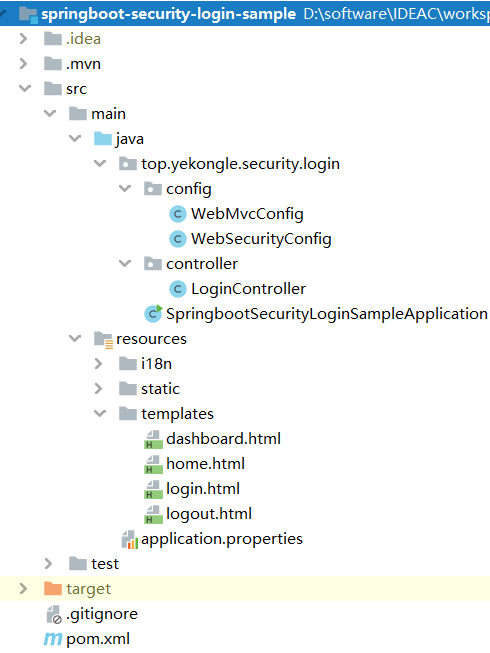
项目结构图如下:

pom 依赖文件如下:

1
2
3
4
5
6
7
8
9
10
11
12
13
14
15
16
17
18
19
20
21
22
23
24
25
26
27
28
29
30
31
32
33
34
35
36
37
38
39
40
41
42
43
44
45
46
47
48
49
50
51
52
53
54
55
56
57
58
59
60
61
62
63
64
65
66
67
68
69
70
71
72
73
74
75
76
77
78
<?xml version="1.0" encoding="UTF-8"?>
<project xmlns="http://maven.apache.org/POM/4.0.0" xmlns:xsi="http://www.w3.org/2001/XMLSchema-instance"
xsi:schemaLocation="http://maven.apache.org/POM/4.0.0 https://maven.apache.org/xsd/maven-4.0.0.xsd">
<modelVersion>4.0.0</modelVersion>
<parent>
<groupId>org.springframework.boot</groupId>
<artifactId>spring-boot-starter-parent</artifactId>
<version>2.2.5.RELEASE</version>
<relativePath/> <!-- lookup parent from repository -->
</parent>
<groupId>top.yekongle</groupId>
<artifactId>springboot-security-login-sample</artifactId>
<version>0.0.1-SNAPSHOT</version>
<name>springboot-security-login-sample</name>
<description>Security login sample for Spring Boot</description>

<properties>
<java.version>1.8</java.version>
</properties>

<dependencies>
<dependency>
<groupId>org.springframework.boot</groupId>
<artifactId>spring-boot-starter-security</artifactId>
</dependency>
<dependency>
<groupId>org.thymeleaf.extras</groupId>
<artifactId>thymeleaf-extras-springsecurity5</artifactId>
</dependency>
<dependency>
<groupId>org.springframework.boot</groupId>
<artifactId>spring-boot-starter-thymeleaf</artifactId>
</dependency>
<dependency>
<groupId>org.springframework.boot</groupId>
<artifactId>spring-boot-starter-web</artifactId>
</dependency>

<dependency>
<groupId>org.springframework.boot</groupId>
<artifactId>spring-boot-devtools</artifactId>
<scope>runtime</scope>
<optional>true</optional>
</dependency>
<dependency>
<groupId>org.projectlombok</groupId>
<artifactId>lombok</artifactId>
<optional>true</optional>
</dependency>
<dependency>
<groupId>org.springframework.boot</groupId>
<artifactId>spring-boot-starter-test</artifactId>
<scope>test</scope>
<exclusions>
<exclusion>
<groupId>org.junit.vintage</groupId>
<artifactId>junit-vintage-engine</artifactId>
</exclusion>
</exclusions>
</dependency>
<dependency>
<groupId>org.springframework.security</groupId>
<artifactId>spring-security-test</artifactId>
<scope>test</scope>
</dependency>
</dependencies>

<build>
<plugins>
<plugin>
<groupId>org.springframework.boot</groupId>
<artifactId>spring-boot-maven-plugin</artifactId>
</plugin>
</plugins>
</build>

</project>

代码编写

application.properties

1
2
3
4
5
6
7
8
9
# 国际化i18n配置,(包名.基础名)
spring.messages.basename=i18n.login
spring.messages.encoding=UTF-8

# Thymeleaf 配置
spring.thymeleaf.prefix=classpath:/templates/
spring.thymeleaf.suffix=.html
# 禁止缓存
spring.thymeleaf.cache=false

Web 安全配置,使用了基于内存的用户认证,初始化了3个用户,有 USER 和 ADMIN 两种权限,不用在前面加 “ROLE_”, spring boot 会自动加上
WebSecurityConfig.java

1
2
3
4
5
6
7
8
9
10
11
12
13
14
15
16
17
18
19
20
21
22
23
24
25
26
27
28
29
30
31
32
33
34
35
36
37
38
39
40
41
42
43
44
45
46
47
48
49
50
51
52
53
54
55
56
57
58
59
60
61
package top.yekongle.security.login.config;

import org.springframework.context.annotation.Bean;
import org.springframework.context.annotation.Configuration;
import org.springframework.http.HttpMethod;
import org.springframework.security.config.annotation.authentication.builders.AuthenticationManagerBuilder;
import org.springframework.security.config.annotation.web.builders.HttpSecurity;
import org.springframework.security.config.annotation.web.configuration.WebSecurityConfigurerAdapter;
import org.springframework.security.crypto.bcrypt.BCryptPasswordEncoder;
import org.springframework.security.crypto.password.PasswordEncoder;

/**
* @Description:
* @Author: Yekongle
* @Date: 2020年5月17日
*/
@Configuration
public class WebSecurityConfig extends WebSecurityConfigurerAdapter {

@Bean
public PasswordEncoder passwordEncoder() {
return new BCryptPasswordEncoder();
}

@Override
protected void configure(AuthenticationManagerBuilder auth) throws Exception {
auth.inMemoryAuthentication()
.withUser("Jack").password("$2a$10$jxi3LTkdNRPMv0Cb6ag9kO/7xYUnkN.9aTKoSag8u3Ep8pBe2rMMm").roles("USER")
.and()
.withUser("David").password("$2a$10$jxi3LTkdNRPMv0Cb6ag9kO/7xYUnkN.9aTKoSag8u3Ep8pBe2rMMm").roles("USER")
.and()
.withUser("Kevin").password("$2a$10$jxi3LTkdNRPMv0Cb6ag9kO/7xYUnkN.9aTKoSag8u3Ep8pBe2rMMm").roles("ADMIN");
}

@Override
protected void configure(HttpSecurity http) throws Exception {
http
.csrf().disable()
.authorizeRequests()
.antMatchers("/css/**", "/js/**", "/fonts/**", "/img/**").permitAll()
.antMatchers(HttpMethod.OPTIONS, "/**").permitAll()
.antMatchers("/admin/**").hasRole("ADMIN")
.antMatchers("/login*", "/logout*").permitAll()
.anyRequest().authenticated()
.and()
.formLogin()
.loginPage("/login")
.defaultSuccessUrl("/home.html")
.failureUrl("/login?error=true").permitAll()
.and()
.logout()
.deleteCookies("JSESSIONID")
.logoutSuccessUrl("/logout.html?logSucc=true").permitAll();
}

/*
* public static void main(String[] args) { System.out.println(new
* BCryptPasswordEncoder().encode("A123456!")); }
*/

}

WebMvcConfig.java

1
2
3
4
5
6
7
8
9
10
11
12
13
14
15
16
17
18
19
20
21
22
23
24
25
26
27
28
29
30
31
32
33
34
35
36
37
38
39
40
41
42
43
44
45
46
47
48
49
50
51
52
53
package top.yekongle.security.login.config;

import java.util.Locale;

import org.springframework.context.annotation.Bean;
import org.springframework.context.annotation.Configuration;
import org.springframework.web.servlet.LocaleResolver;
import org.springframework.web.servlet.config.annotation.InterceptorRegistry;
import org.springframework.web.servlet.config.annotation.ViewControllerRegistry;
import org.springframework.web.servlet.config.annotation.WebMvcConfigurer;
import org.springframework.web.servlet.i18n.CookieLocaleResolver;
import org.springframework.web.servlet.i18n.LocaleChangeInterceptor;

/**
* @Description: I18n config
* @Author: Yekongle
* @Date: Mar 22, 2020
*/
@Configuration
public class WebMvcConfig implements WebMvcConfigurer {
@Override
public void addViewControllers(ViewControllerRegistry registry) {
//设置对"/"的请求映射到login
//如果没有逻辑业务,没有必要用控制器方法对请求进行映射
registry.addViewController("/").setViewName("forward:/login");
registry.addViewController("/admin").setViewName("dashboard");
registry.addViewController("/logout.html");
registry.addViewController("/home.html");
}

/*
* 配置拦截器获取URL中的 lang 参数 (?lang=zh_CN)
* */
@Override
public void addInterceptors(final InterceptorRegistry registry) {
final LocaleChangeInterceptor localeChangeInterceptor = new LocaleChangeInterceptor();
localeChangeInterceptor.setParamName("lang");
registry.addInterceptor(localeChangeInterceptor);
}

/*
* 注册我们自定义的区域解析器,
* 一旦将区域解析器注册到Spring容器中
* 则SpingBoot默认提供的区域解析器将不会自动注册
*/
@Bean
public LocaleResolver localeResolver() {
final CookieLocaleResolver cookieLocaleResolver = new CookieLocaleResolver();
cookieLocaleResolver.setDefaultLocale(Locale.CHINESE);
return cookieLocaleResolver;
}

}

登录控制跳转
LoginController.java

1
2
3
4
5
6
7
8
9
10
11
12
13
14
15
16
17
18
19
20
21
22
23
24
25
26
package top.yekongle.security.login.controller;

import org.springframework.security.authentication.AnonymousAuthenticationToken;
import org.springframework.security.core.Authentication;
import org.springframework.security.core.context.SecurityContextHolder;
import org.springframework.stereotype.Controller;
import org.springframework.web.bind.annotation.GetMapping;

/**
* @Description:
* @Author: Yekongle
* @Date: 2020年5月17日
*/
@Controller
public class LoginController {
@GetMapping("/login")
public String login() {
Authentication auth = SecurityContextHolder.getContext().getAuthentication();
if (auth instanceof AnonymousAuthenticationToken) {
return "login";
} else {
return "home";
}
}
}

登录页面
login.html

1
2
3
4
5
6
7
8
9
10
11
12
13
14
15
16
17
18
19
20
21
22
23
24
25
26
27
28
29
30
31
32
33
34
35
36
37
38
39
40
<!DOCTYPE html>
<html lang="en" xmlns:th="http://www.thymeleaf.org">
<head>
<meta http-equiv="Content-Type" content="text/html; charset=UTF-8">
<meta name="viewport" content="width=device-width, initial-scale=1, shrink-to-fit=no">
<meta name="description" content="">
<meta name="author" content="">
<title>Signin Template for Bootstrap</title>
<!-- Bootstrap core CSS -->
<link href="/css/bootstrap.min.css" th:href="@{/css/bootstrap.min.css}" rel="stylesheet">
<!-- Custom styles for this template -->
<link href="/css/signin.css" th:href="@{/css/signin.css}" rel="stylesheet">
</head>

<body class="text-center">

<form class="form-signin" action="login" method='POST'>
<div th:if="${param.error != null}" class="alert alert-danger" >[[#{login.error}]]</div>
<img class="mb-4" src="/img/bootstrap-solid.svg" alt="" width="72" height="72">
<h1 class="h3 mb-3 font-weight-normal" th:text="#{login.tip}">Please sign in</h1>
<label class="sr-only">Username</label>
<input type="text" name="username" class="form-control" th:placeholder="#{login.username}" required="" autofocus="">
<label class="sr-only">Password</label>
<input type="password" name="password" class="form-control" th:placeholder="#{login.password}" required="">
<div class="checkbox mb-3">
<label>
<input type="checkbox" value="remember"> [[#{login.remember}]]
</label>
</div>
<button class="btn btn-lg btn-primary btn-block" th:text="#{login.btn}" type="submit">Sign in</button>
<p class="mt-5 mb-3 text-muted">© 2017-2020</p>
<a class="btn btn-sm" th:href="@{/login(lang='zh_CN')}">中文</a>
<a class="btn btn-sm" th:href="@{/login(lang='en_US')}">English</a>
</form>


<script th:src="@{/js/jquery-3.5.1.min.js}" type="text/javascript"></script>
<script th:src="@{/js/bootstrap.min.js}" type="text/javascript"></script>
</body>
</html>

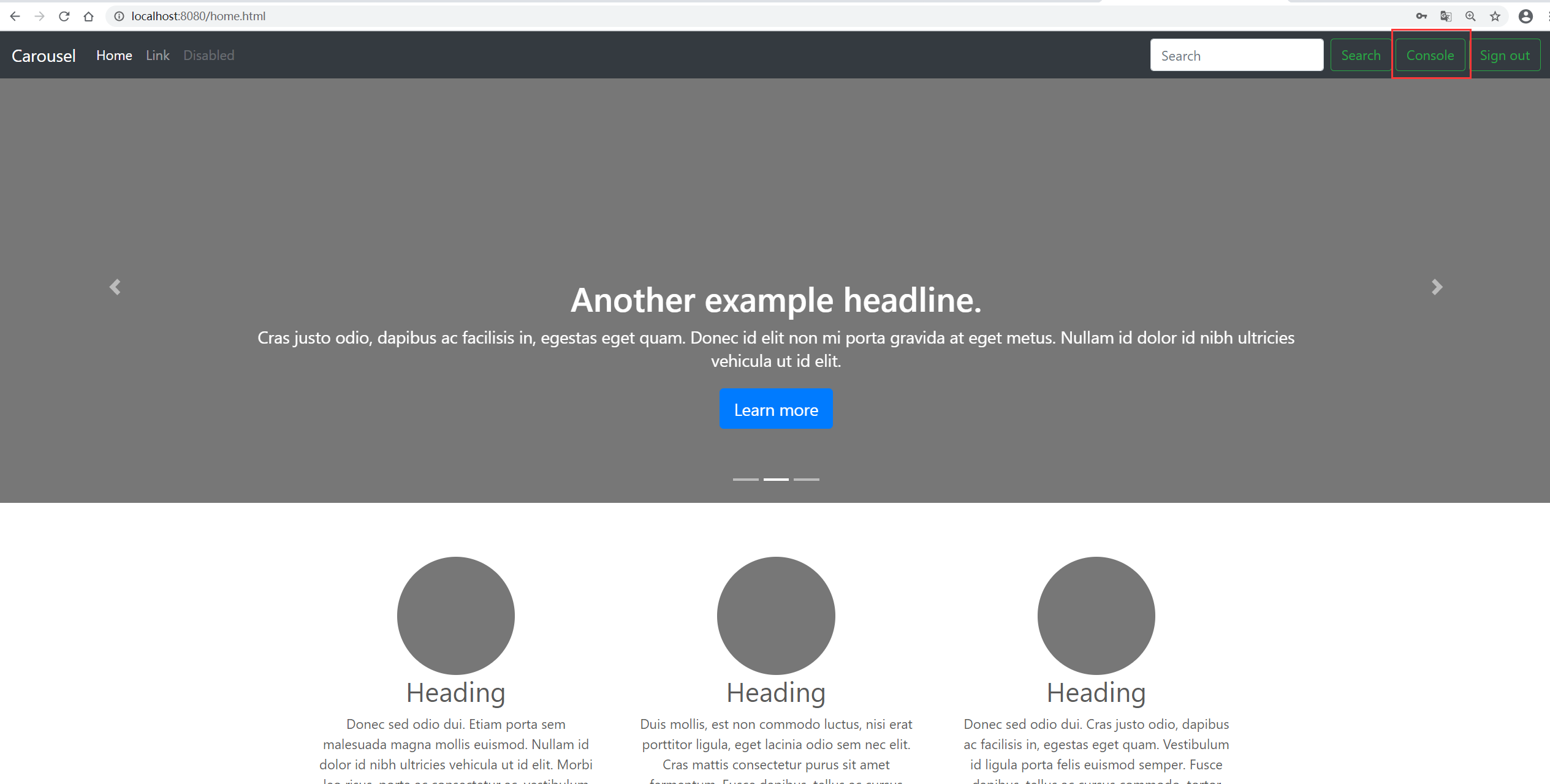
主页,注意下面这一句,只有拥有 “ADMIN” 角色的用户才能看到

1
<a sec:authorize="hasAuthority('ROLE_ADMIN')"  class="btn btn-outline-success my-2 my-sm-0" th:href="@{/admin}">Console</a>

home.html

1
2
3
4
5
6
7
8
9
10
11
12
13
14
15
16
17
18
19
20
21
22
23
24
25
26
27
28
29
30
31
32
33
34
35
36
37
38
39
40
41
42
43
44
45
46
47
48
49
50
51
52
53
54
55
56
57
58
59
60
61
62
63
64
65
66
67
68
69
70
71
72
73
74
75
76
77
78
79
80
81
82
83
84
85
86
87
88
89
90
91
92
93
94
95
96
97
98
99
100
101
102
103
104
105
106
107
108
109
110
111
112
113
114
115
116
117
118
119
120
121
122
123
124
125
126
127
128
129
130
131
132
133
134
135
136
137
138
139
140
141
142
143
144
145
146
147
148
149
150
151
152
153
154
155
156
157
158
159
160
161
162
163
164
165
166
167
168
169
170
171
172
173
174
175
176
177
178
179
180
181
182
183
184
185
186
187
188
189
190
191
192
193
194
195
196
197
198
199
200
201
202
203
204
<!DOCTYPE html>
<!-- saved from url=(0046)https://v4.bootcss.com/docs/examples/carousel/ -->
<html lang="en"><head><meta http-equiv="Content-Type" content="text/html; charset=UTF-8">

<meta name="viewport" content="width=device-width, initial-scale=1, shrink-to-fit=no">
<meta name="description" content="">
<meta name="author" content="Mark Otto, Jacob Thornton, and Bootstrap contributors">
<meta name="generator" content="Jekyll v3.8.6">
<title>Carousel Template · Bootstrap</title>

<link rel="canonical" href="https://v4.bootcss.com/docs/examples/carousel/">

<!-- Bootstrap core CSS -->
<link href="/css/bootstrap.min.css" th:href="@{/css/bootstrap.min.css}" rel="stylesheet">

<meta name="theme-color" content="#563d7c">


<style>
.bd-placeholder-img {
font-size: 1.125rem;
text-anchor: middle;
-webkit-user-select: none;
-moz-user-select: none;
-ms-user-select: none;
user-select: none;
}

@media (min-width: 768px) {
.bd-placeholder-img-lg {
font-size: 3.5rem;
}
}
</style>
<!-- Custom styles for this template -->
<link th:href="@{/css/carousel.css}" rel="stylesheet">
</head>
<body>
<header>
<nav class="navbar navbar-expand-md navbar-dark fixed-top bg-dark">
<a class="navbar-brand" href="https://v4.bootcss.com/docs/examples/carousel/#">Carousel</a>
<button class="navbar-toggler" type="button" data-toggle="collapse" data-target="#navbarCollapse" aria-controls="navbarCollapse" aria-expanded="false" aria-label="Toggle navigation">
<span class="navbar-toggler-icon"></span>
</button>
<div class="collapse navbar-collapse" id="navbarCollapse">
<ul class="navbar-nav mr-auto">
<li class="nav-item active">
<a class="nav-link" href="https://v4.bootcss.com/docs/examples/carousel/#">Home <span class="sr-only">(current)</span></a>
</li>
<li class="nav-item">
<a class="nav-link" href="https://v4.bootcss.com/docs/examples/carousel/#">Link</a>
</li>
<li class="nav-item">
<a class="nav-link disabled" href="https://v4.bootcss.com/docs/examples/carousel/#" tabindex="-1" aria-disabled="true">Disabled</a>
</li>
</ul>
<form class="form-inline mt-2 mt-md-0">
<input class="form-control mr-sm-2" type="text" placeholder="Search" aria-label="Search">

<button class="btn btn-outline-success my-2 my-sm-0" type="submit">Search</button>&nbsp
<a sec:authorize="hasAuthority('ROLE_ADMIN')" class="btn btn-outline-success my-2 my-sm-0" th:href="@{/admin}">Console</a>&nbsp
<a class="btn btn-outline-success my-2 my-sm-0" th:href="@{/logout}">Sign out</a>
</form>
</div>
</nav>
</header>

<main role="main">

<div id="myCarousel" class="carousel slide" data-ride="carousel">
<ol class="carousel-indicators">
<li data-target="#myCarousel" data-slide-to="0" class=""></li>
<li data-target="#myCarousel" data-slide-to="1" class="active"></li>
<li data-target="#myCarousel" data-slide-to="2" class=""></li>
</ol>
<div class="carousel-inner">
<div class="carousel-item">
<svg class="bd-placeholder-img" width="100%" height="100%" xmlns="http://www.w3.org/2000/svg" preserveAspectRatio="xMidYMid slice" focusable="false" role="img"><rect width="100%" height="100%" fill="#777"></rect></svg>
<div class="container">
<div class="carousel-caption text-left">
<h1>Example headline.</h1>
<p>Cras justo odio, dapibus ac facilisis in, egestas eget quam. Donec id elit non mi porta gravida at eget metus. Nullam id dolor id nibh ultricies vehicula ut id elit.</p>
<p><a class="btn btn-lg btn-primary" href="https://v4.bootcss.com/docs/examples/carousel/#" role="button">Sign up today</a></p>
</div>
</div>
</div>
<div class="carousel-item active">
<svg class="bd-placeholder-img" width="100%" height="100%" xmlns="http://www.w3.org/2000/svg" preserveAspectRatio="xMidYMid slice" focusable="false" role="img"><rect width="100%" height="100%" fill="#777"></rect></svg>
<div class="container">
<div class="carousel-caption">
<h1>Another example headline.</h1>
<p>Cras justo odio, dapibus ac facilisis in, egestas eget quam. Donec id elit non mi porta gravida at eget metus. Nullam id dolor id nibh ultricies vehicula ut id elit.</p>
<p><a class="btn btn-lg btn-primary" href="https://v4.bootcss.com/docs/examples/carousel/#" role="button">Learn more</a></p>
</div>
</div>
</div>
<div class="carousel-item">
<svg class="bd-placeholder-img" width="100%" height="100%" xmlns="http://www.w3.org/2000/svg" preserveAspectRatio="xMidYMid slice" focusable="false" role="img"><rect width="100%" height="100%" fill="#777"></rect></svg>
<div class="container">
<div class="carousel-caption text-right">
<h1>One more for good measure.</h1>
<p>Cras justo odio, dapibus ac facilisis in, egestas eget quam. Donec id elit non mi porta gravida at eget metus. Nullam id dolor id nibh ultricies vehicula ut id elit.</p>
<p><a class="btn btn-lg btn-primary" href="https://v4.bootcss.com/docs/examples/carousel/#" role="button">Browse gallery</a></p>
</div>
</div>
</div>
</div>
<a class="carousel-control-prev" href="https://v4.bootcss.com/docs/examples/carousel/#myCarousel" role="button" data-slide="prev">
<span class="carousel-control-prev-icon" aria-hidden="true"></span>
<span class="sr-only">Previous</span>
</a>
<a class="carousel-control-next" href="https://v4.bootcss.com/docs/examples/carousel/#myCarousel" role="button" data-slide="next">
<span class="carousel-control-next-icon" aria-hidden="true"></span>
<span class="sr-only">Next</span>
</a>
</div>


<!-- Marketing messaging and featurettes
================================================== -->
<!-- Wrap the rest of the page in another container to center all the content. -->

<div class="container marketing">

<!-- Three columns of text below the carousel -->
<div class="row">
<div class="col-lg-4">
<svg class="bd-placeholder-img rounded-circle" width="140" height="140" xmlns="http://www.w3.org/2000/svg" preserveAspectRatio="xMidYMid slice" focusable="false" role="img" aria-label="Placeholder: 140x140"><title>Placeholder</title><rect width="100%" height="100%" fill="#777"></rect><text x="50%" y="50%" fill="#777" dy=".3em">140x140</text></svg>
<h2>Heading</h2>
<p>Donec sed odio dui. Etiam porta sem malesuada magna mollis euismod. Nullam id dolor id nibh ultricies vehicula ut id elit. Morbi leo risus, porta ac consectetur ac, vestibulum at eros. Praesent commodo cursus magna.</p>
<p><a class="btn btn-secondary" href="https://v4.bootcss.com/docs/examples/carousel/#" role="button">View details »</a></p>
</div><!-- /.col-lg-4 -->
<div class="col-lg-4">
<svg class="bd-placeholder-img rounded-circle" width="140" height="140" xmlns="http://www.w3.org/2000/svg" preserveAspectRatio="xMidYMid slice" focusable="false" role="img" aria-label="Placeholder: 140x140"><title>Placeholder</title><rect width="100%" height="100%" fill="#777"></rect><text x="50%" y="50%" fill="#777" dy=".3em">140x140</text></svg>
<h2>Heading</h2>
<p>Duis mollis, est non commodo luctus, nisi erat porttitor ligula, eget lacinia odio sem nec elit. Cras mattis consectetur purus sit amet fermentum. Fusce dapibus, tellus ac cursus commodo, tortor mauris condimentum nibh.</p>
<p><a class="btn btn-secondary" href="https://v4.bootcss.com/docs/examples/carousel/#" role="button">View details »</a></p>
</div><!-- /.col-lg-4 -->
<div class="col-lg-4">
<svg class="bd-placeholder-img rounded-circle" width="140" height="140" xmlns="http://www.w3.org/2000/svg" preserveAspectRatio="xMidYMid slice" focusable="false" role="img" aria-label="Placeholder: 140x140"><title>Placeholder</title><rect width="100%" height="100%" fill="#777"></rect><text x="50%" y="50%" fill="#777" dy=".3em">140x140</text></svg>
<h2>Heading</h2>
<p>Donec sed odio dui. Cras justo odio, dapibus ac facilisis in, egestas eget quam. Vestibulum id ligula porta felis euismod semper. Fusce dapibus, tellus ac cursus commodo, tortor mauris condimentum nibh, ut fermentum massa justo sit amet risus.</p>
<p><a class="btn btn-secondary" href="https://v4.bootcss.com/docs/examples/carousel/#" role="button">View details »</a></p>
</div><!-- /.col-lg-4 -->
</div><!-- /.row -->


<!-- START THE FEATURETTES -->

<hr class="featurette-divider">

<div class="row featurette">
<div class="col-md-7">
<h2 class="featurette-heading">First featurette heading. <span class="text-muted">It’ll blow your mind.</span></h2>
<p class="lead">Donec ullamcorper nulla non metus auctor fringilla. Vestibulum id ligula porta felis euismod semper. Praesent commodo cursus magna, vel scelerisque nisl consectetur. Fusce dapibus, tellus ac cursus commodo.</p>
</div>
<div class="col-md-5">
<svg class="bd-placeholder-img bd-placeholder-img-lg featurette-image img-fluid mx-auto" width="500" height="500" xmlns="http://www.w3.org/2000/svg" preserveAspectRatio="xMidYMid slice" focusable="false" role="img" aria-label="Placeholder: 500x500"><title>Placeholder</title><rect width="100%" height="100%" fill="#eee"></rect><text x="50%" y="50%" fill="#aaa" dy=".3em">500x500</text></svg>
</div>
</div>

<hr class="featurette-divider">

<div class="row featurette">
<div class="col-md-7 order-md-2">
<h2 class="featurette-heading">Oh yeah, it’s that good. <span class="text-muted">See for yourself.</span></h2>
<p class="lead">Donec ullamcorper nulla non metus auctor fringilla. Vestibulum id ligula porta felis euismod semper. Praesent commodo cursus magna, vel scelerisque nisl consectetur. Fusce dapibus, tellus ac cursus commodo.</p>
</div>
<div class="col-md-5 order-md-1">
<svg class="bd-placeholder-img bd-placeholder-img-lg featurette-image img-fluid mx-auto" width="500" height="500" xmlns="http://www.w3.org/2000/svg" preserveAspectRatio="xMidYMid slice" focusable="false" role="img" aria-label="Placeholder: 500x500"><title>Placeholder</title><rect width="100%" height="100%" fill="#eee"></rect><text x="50%" y="50%" fill="#aaa" dy=".3em">500x500</text></svg>
</div>
</div>

<hr class="featurette-divider">

<div class="row featurette">
<div class="col-md-7">
<h2 class="featurette-heading">And lastly, this one. <span class="text-muted">Checkmate.</span></h2>
<p class="lead">Donec ullamcorper nulla non metus auctor fringilla. Vestibulum id ligula porta felis euismod semper. Praesent commodo cursus magna, vel scelerisque nisl consectetur. Fusce dapibus, tellus ac cursus commodo.</p>
</div>
<div class="col-md-5">
<svg class="bd-placeholder-img bd-placeholder-img-lg featurette-image img-fluid mx-auto" width="500" height="500" xmlns="http://www.w3.org/2000/svg" preserveAspectRatio="xMidYMid slice" focusable="false" role="img" aria-label="Placeholder: 500x500"><title>Placeholder</title><rect width="100%" height="100%" fill="#eee"></rect><text x="50%" y="50%" fill="#aaa" dy=".3em">500x500</text></svg>
</div>
</div>

<hr class="featurette-divider">

<!-- /END THE FEATURETTES -->

</div><!-- /.container -->


<!-- FOOTER -->
<footer class="container">
<p class="float-right"><a href="https://v4.bootcss.com/docs/examples/carousel/#">Back to top</a></p>
<p>© 2017-2020 Company, Inc. · <a href="https://v4.bootcss.com/docs/examples/carousel/#">Privacy</a> · <a href="https://v4.bootcss.com/docs/examples/carousel/#">Terms</a></p>
</footer>
</main>
<script src="./Dashboard_Bootstrap_files/jquery.slim.min.js" th:src="@{/js/jquery.slim.min.js}" ></script>
<script>window.jQuery || document.write('<script src="/docs/assets/js/vendor/jquery.slim.min.js"><\/script>')</script>
<script src="./Dashboard_Bootstrap_files/bootstrap.bundle.min.js" th:src="@{/js/bootstrap.bundle.min.js}" ></script>

</body>
</html>

控制台面板
dashboard.html

1
2
3
4
5
6
7
8
9
10
11
12
13
14
15
16
17
18
19
20
21
22
23
24
25
26
27
28
29
30
31
32
33
34
35
36
37
38
39
40
41
42
43
44
45
46
47
48
49
50
51
52
53
54
55
56
57
58
59
60
61
62
63
64
65
66
67
68
69
70
71
72
73
74
75
76
77
78
79
80
81
82
83
84
85
86
87
88
89
90
91
92
93
94
95
96
97
98
99
100
101
102
103
104
105
106
107
108
109
110
111
112
113
114
115
116
117
118
119
120
121
122
123
124
125
126
127
128
129
130
131
132
133
134
135
136
137
138
139
140
141
142
143
144
145
146
147
148
149
150
151
152
153
154
155
156
157
158
159
160
161
162
163
164
165
166
167
168
169
170
171
172
173
174
175
176
177
178
179
180
181
182
183
184
185
186
187
188
189
190
191
192
193
194
195
196
197
198
199
200
201
202
203
204
205
206
207
208
209
210
211
212
213
214
215
216
217
218
219
220
221
222
223
224
225
226
227
228
229
230
231
232
233
234
235
236
237
238
239
240
241
242
243
244
245
246
247
248
249
250
251
252
253
254
255
256
257
258
259
260
261
262
263
264
265
266
267
268
269
270
271
272
273
274
275
<!DOCTYPE html>
<!-- saved from url=(0047)https://v4.bootcss.com/docs/examples/dashboard/ -->
<html lang="en"><head><meta http-equiv="Content-Type" content="text/html; charset=UTF-8">

<meta name="viewport" content="width=device-width, initial-scale=1, shrink-to-fit=no">


<!-- Bootstrap core CSS -->
<link href="/css/bootstrap.min.css" th:href="@{/css/bootstrap.min.css}" rel="stylesheet">
<style>
.bd-placeholder-img {
font-size: 1.125rem;
text-anchor: middle;
-webkit-user-select: none;
-moz-user-select: none;
-ms-user-select: none;
user-select: none;
}

@media (min-width: 768px) {
.bd-placeholder-img-lg {
font-size: 3.5rem;
}
}
</style>
<!-- Custom styles for this template -->
<link href="/css/bootstrap.min.css" th:href="@{/css/dashboard.css}" rel="stylesheet">
<style type="text/css">/* Chart.js */
@-webkit-keyframes chartjs-render-animation{from{opacity:0.99}to{opacity:1}}@keyframes chartjs-render-animation{from{opacity:0.99}to{opacity:1}}.chartjs-render-monitor{-webkit-animation:chartjs-render-animation 0.001s;animation:chartjs-render-animation 0.001s;}</style></head>
<body>
<nav class="navbar navbar-dark fixed-top bg-dark flex-md-nowrap p-0 shadow">
<a class="navbar-brand col-sm-3 col-md-2 mr-0" href="https://v4.bootcss.com/docs/examples/dashboard/#">Company name</a>
<input class="form-control form-control-dark w-100" type="text" placeholder="Search" aria-label="Search">
<ul class="navbar-nav px-3">

<li class="nav-item text-nowrap">
<a class="nav-link" href="https://v4.bootcss.com/docs/examples/dashboard/#" th:href="@{/logout}">Sign out</a>
</li>
</ul>
</nav>

<div class="container-fluid">
<div class="row">
<nav class="col-md-2 d-none d-md-block bg-light sidebar">
<div class="sidebar-sticky">
<ul class="nav flex-column">
<li class="nav-item">
<a class="nav-link active" href="https://v4.bootcss.com/docs/examples/dashboard/#">
<svg xmlns="http://www.w3.org/2000/svg" width="24" height="24" viewBox="0 0 24 24" fill="none" stroke="currentColor" stroke-width="2" stroke-linecap="round" stroke-linejoin="round" class="feather feather-home"><path d="M3 9l9-7 9 7v11a2 2 0 0 1-2 2H5a2 2 0 0 1-2-2z"></path><polyline points="9 22 9 12 15 12 15 22"></polyline></svg>
Dashboard <span class="sr-only">(current)</span>
</a>
</li>
<li class="nav-item">
<a class="nav-link" href="https://v4.bootcss.com/docs/examples/dashboard/#">
<svg xmlns="http://www.w3.org/2000/svg" width="24" height="24" viewBox="0 0 24 24" fill="none" stroke="currentColor" stroke-width="2" stroke-linecap="round" stroke-linejoin="round" class="feather feather-file"><path d="M13 2H6a2 2 0 0 0-2 2v16a2 2 0 0 0 2 2h12a2 2 0 0 0 2-2V9z"></path><polyline points="13 2 13 9 20 9"></polyline></svg>
Orders
</a>
</li>
<li class="nav-item">
<a class="nav-link" href="https://v4.bootcss.com/docs/examples/dashboard/#">
<svg xmlns="http://www.w3.org/2000/svg" width="24" height="24" viewBox="0 0 24 24" fill="none" stroke="currentColor" stroke-width="2" stroke-linecap="round" stroke-linejoin="round" class="feather feather-shopping-cart"><circle cx="9" cy="21" r="1"></circle><circle cx="20" cy="21" r="1"></circle><path d="M1 1h4l2.68 13.39a2 2 0 0 0 2 1.61h9.72a2 2 0 0 0 2-1.61L23 6H6"></path></svg>
Products
</a>
</li>
<li class="nav-item">
<a class="nav-link" href="https://v4.bootcss.com/docs/examples/dashboard/#">
<svg xmlns="http://www.w3.org/2000/svg" width="24" height="24" viewBox="0 0 24 24" fill="none" stroke="currentColor" stroke-width="2" stroke-linecap="round" stroke-linejoin="round" class="feather feather-users"><path d="M17 21v-2a4 4 0 0 0-4-4H5a4 4 0 0 0-4 4v2"></path><circle cx="9" cy="7" r="4"></circle><path d="M23 21v-2a4 4 0 0 0-3-3.87"></path><path d="M16 3.13a4 4 0 0 1 0 7.75"></path></svg>
Customers
</a>
</li>
<li class="nav-item">
<a class="nav-link" href="https://v4.bootcss.com/docs/examples/dashboard/#">
<svg xmlns="http://www.w3.org/2000/svg" width="24" height="24" viewBox="0 0 24 24" fill="none" stroke="currentColor" stroke-width="2" stroke-linecap="round" stroke-linejoin="round" class="feather feather-bar-chart-2"><line x1="18" y1="20" x2="18" y2="10"></line><line x1="12" y1="20" x2="12" y2="4"></line><line x1="6" y1="20" x2="6" y2="14"></line></svg>
Reports
</a>
</li>
<li class="nav-item">
<a class="nav-link" href="https://v4.bootcss.com/docs/examples/dashboard/#">
<svg xmlns="http://www.w3.org/2000/svg" width="24" height="24" viewBox="0 0 24 24" fill="none" stroke="currentColor" stroke-width="2" stroke-linecap="round" stroke-linejoin="round" class="feather feather-layers"><polygon points="12 2 2 7 12 12 22 7 12 2"></polygon><polyline points="2 17 12 22 22 17"></polyline><polyline points="2 12 12 17 22 12"></polyline></svg>
Integrations
</a>
</li>
</ul>

<h6 class="sidebar-heading d-flex justify-content-between align-items-center px-3 mt-4 mb-1 text-muted">
<span>Saved reports</span>
<a class="d-flex align-items-center text-muted" href="https://v4.bootcss.com/docs/examples/dashboard/#" aria-label="Add a new report">
<svg xmlns="http://www.w3.org/2000/svg" width="24" height="24" viewBox="0 0 24 24" fill="none" stroke="currentColor" stroke-width="2" stroke-linecap="round" stroke-linejoin="round" class="feather feather-plus-circle"><circle cx="12" cy="12" r="10"></circle><line x1="12" y1="8" x2="12" y2="16"></line><line x1="8" y1="12" x2="16" y2="12"></line></svg>
</a>
</h6>
<ul class="nav flex-column mb-2">
<li class="nav-item">
<a class="nav-link" href="https://v4.bootcss.com/docs/examples/dashboard/#">
<svg xmlns="http://www.w3.org/2000/svg" width="24" height="24" viewBox="0 0 24 24" fill="none" stroke="currentColor" stroke-width="2" stroke-linecap="round" stroke-linejoin="round" class="feather feather-file-text"><path d="M14 2H6a2 2 0 0 0-2 2v16a2 2 0 0 0 2 2h12a2 2 0 0 0 2-2V8z"></path><polyline points="14 2 14 8 20 8"></polyline><line x1="16" y1="13" x2="8" y2="13"></line><line x1="16" y1="17" x2="8" y2="17"></line><polyline points="10 9 9 9 8 9"></polyline></svg>
Current month
</a>
</li>
<li class="nav-item">
<a class="nav-link" href="https://v4.bootcss.com/docs/examples/dashboard/#">
<svg xmlns="http://www.w3.org/2000/svg" width="24" height="24" viewBox="0 0 24 24" fill="none" stroke="currentColor" stroke-width="2" stroke-linecap="round" stroke-linejoin="round" class="feather feather-file-text"><path d="M14 2H6a2 2 0 0 0-2 2v16a2 2 0 0 0 2 2h12a2 2 0 0 0 2-2V8z"></path><polyline points="14 2 14 8 20 8"></polyline><line x1="16" y1="13" x2="8" y2="13"></line><line x1="16" y1="17" x2="8" y2="17"></line><polyline points="10 9 9 9 8 9"></polyline></svg>
Last quarter
</a>
</li>
<li class="nav-item">
<a class="nav-link" href="https://v4.bootcss.com/docs/examples/dashboard/#">
<svg xmlns="http://www.w3.org/2000/svg" width="24" height="24" viewBox="0 0 24 24" fill="none" stroke="currentColor" stroke-width="2" stroke-linecap="round" stroke-linejoin="round" class="feather feather-file-text"><path d="M14 2H6a2 2 0 0 0-2 2v16a2 2 0 0 0 2 2h12a2 2 0 0 0 2-2V8z"></path><polyline points="14 2 14 8 20 8"></polyline><line x1="16" y1="13" x2="8" y2="13"></line><line x1="16" y1="17" x2="8" y2="17"></line><polyline points="10 9 9 9 8 9"></polyline></svg>
Social engagement
</a>
</li>
<li class="nav-item">
<a class="nav-link" href="https://v4.bootcss.com/docs/examples/dashboard/#">
<svg xmlns="http://www.w3.org/2000/svg" width="24" height="24" viewBox="0 0 24 24" fill="none" stroke="currentColor" stroke-width="2" stroke-linecap="round" stroke-linejoin="round" class="feather feather-file-text"><path d="M14 2H6a2 2 0 0 0-2 2v16a2 2 0 0 0 2 2h12a2 2 0 0 0 2-2V8z"></path><polyline points="14 2 14 8 20 8"></polyline><line x1="16" y1="13" x2="8" y2="13"></line><line x1="16" y1="17" x2="8" y2="17"></line><polyline points="10 9 9 9 8 9"></polyline></svg>
Year-end sale
</a>
</li>
</ul>
</div>
</nav>

<main role="main" class="col-md-9 ml-sm-auto col-lg-10 px-4"><div class="chartjs-size-monitor" style="position: absolute; left: 0px; top: 0px; right: 0px; bottom: 0px; overflow: hidden; pointer-events: none; visibility: hidden; z-index: -1;"><div class="chartjs-size-monitor-expand" style="position:absolute;left:0;top:0;right:0;bottom:0;overflow:hidden;pointer-events:none;visibility:hidden;z-index:-1;"><div style="position:absolute;width:1000000px;height:1000000px;left:0;top:0"></div></div><div class="chartjs-size-monitor-shrink" style="position:absolute;left:0;top:0;right:0;bottom:0;overflow:hidden;pointer-events:none;visibility:hidden;z-index:-1;"><div style="position:absolute;width:200%;height:200%;left:0; top:0"></div></div></div>
<div class="d-flex justify-content-between flex-wrap flex-md-nowrap align-items-center pt-3 pb-2 mb-3 border-bottom">
<h1 class="h2">Dashboard</h1>
<div class="btn-toolbar mb-2 mb-md-0">
<div class="btn-group mr-2">
<button type="button" class="btn btn-sm btn-outline-secondary">Share</button>
<button type="button" class="btn btn-sm btn-outline-secondary">Export</button>
</div>
<button type="button" class="btn btn-sm btn-outline-secondary dropdown-toggle">
<svg xmlns="http://www.w3.org/2000/svg" width="24" height="24" viewBox="0 0 24 24" fill="none" stroke="currentColor" stroke-width="2" stroke-linecap="round" stroke-linejoin="round" class="feather feather-calendar"><rect x="3" y="4" width="18" height="18" rx="2" ry="2"></rect><line x1="16" y1="2" x2="16" y2="6"></line><line x1="8" y1="2" x2="8" y2="6"></line><line x1="3" y1="10" x2="21" y2="10"></line></svg>
This week
</button>
</div>
</div>

<canvas class="my-4 w-100 chartjs-render-monitor" id="myChart" width="2049" height="864" style="display: block; height: 576px; width: 1366px;"></canvas>

<h2>Section title</h2>
<div class="table-responsive">
<table class="table table-striped table-sm">
<thead>
<tr>
<th>#</th>
<th>Header</th>
<th>Header</th>
<th>Header</th>
<th>Header</th>
</tr>
</thead>
<tbody>
<tr>
<td>1,001</td>
<td>Lorem</td>
<td>ipsum</td>
<td>dolor</td>
<td>sit</td>
</tr>
<tr>
<td>1,002</td>
<td>amet</td>
<td>consectetur</td>
<td>adipiscing</td>
<td>elit</td>
</tr>
<tr>
<td>1,003</td>
<td>Integer</td>
<td>nec</td>
<td>odio</td>
<td>Praesent</td>
</tr>
<tr>
<td>1,003</td>
<td>libero</td>
<td>Sed</td>
<td>cursus</td>
<td>ante</td>
</tr>
<tr>
<td>1,004</td>
<td>dapibus</td>
<td>diam</td>
<td>Sed</td>
<td>nisi</td>
</tr>
<tr>
<td>1,005</td>
<td>Nulla</td>
<td>quis</td>
<td>sem</td>
<td>at</td>
</tr>
<tr>
<td>1,006</td>
<td>nibh</td>
<td>elementum</td>
<td>imperdiet</td>
<td>Duis</td>
</tr>
<tr>
<td>1,007</td>
<td>sagittis</td>
<td>ipsum</td>
<td>Praesent</td>
<td>mauris</td>
</tr>
<tr>
<td>1,008</td>
<td>Fusce</td>
<td>nec</td>
<td>tellus</td>
<td>sed</td>
</tr>
<tr>
<td>1,009</td>
<td>augue</td>
<td>semper</td>
<td>porta</td>
<td>Mauris</td>
</tr>
<tr>
<td>1,010</td>
<td>massa</td>
<td>Vestibulum</td>
<td>lacinia</td>
<td>arcu</td>
</tr>
<tr>
<td>1,011</td>
<td>eget</td>
<td>nulla</td>
<td>Class</td>
<td>aptent</td>
</tr>
<tr>
<td>1,012</td>
<td>taciti</td>
<td>sociosqu</td>
<td>ad</td>
<td>litora</td>
</tr>
<tr>
<td>1,013</td>
<td>torquent</td>
<td>per</td>
<td>conubia</td>
<td>nostra</td>
</tr>
<tr>
<td>1,014</td>
<td>per</td>
<td>inceptos</td>
<td>himenaeos</td>
<td>Curabitur</td>
</tr>
<tr>
<td>1,015</td>
<td>sodales</td>
<td>ligula</td>
<td>in</td>
<td>libero</td>
</tr>
</tbody>
</table>
</div>
</main>
</div>
</div>

<script src="./Dashboard_Bootstrap_files/jquery.slim.min.js" th:src="@{/js/jquery.slim.min.js}" ></script>
<script src="./Dashboard_Bootstrap_files/bootstrap.bundle.min.js" th:src="@{/js/bootstrap.bundle.min.js}" ></script>
<script src="./Dashboard_Bootstrap_files/feather.min.js" th:src="@{/js/feather.min.js}" ></script>
<script src="./Dashboard_Bootstrap_files/Chart.min.js" th:src="@{/js/Chart.min.js}"></script>
<script src="./Dashboard_Bootstrap_files/dashboard.js" th:src="@{/js/dashboard.js}"></script>

</body></html>

logout.html

1
2
3
4
5
6
7
8
9
10
11
12
13
14
15
16
<html xmlns:th="http://www.thymeleaf.org"><!-- Thymeleaf的命名空间,将静态页面转换为动态的视图 -->
<head>
<meta content="text/html;charset=UTF-8"/>
<meta name="viewport" content="width=device-width, initial-scale=1"/>
<link th:href="@{/css/bootstrap.min.css}" rel="stylesheet"/>
</head>

<body>
<div class="container">
<h1 id="success" class="alert alert-info" th:if="${param.logSucc}" >退出登录成功</h1>
<br/><br/><br/>
<a class="btn btn-primary" th:href="@{/login}" >登录</a>
</div>
</body>

</html>

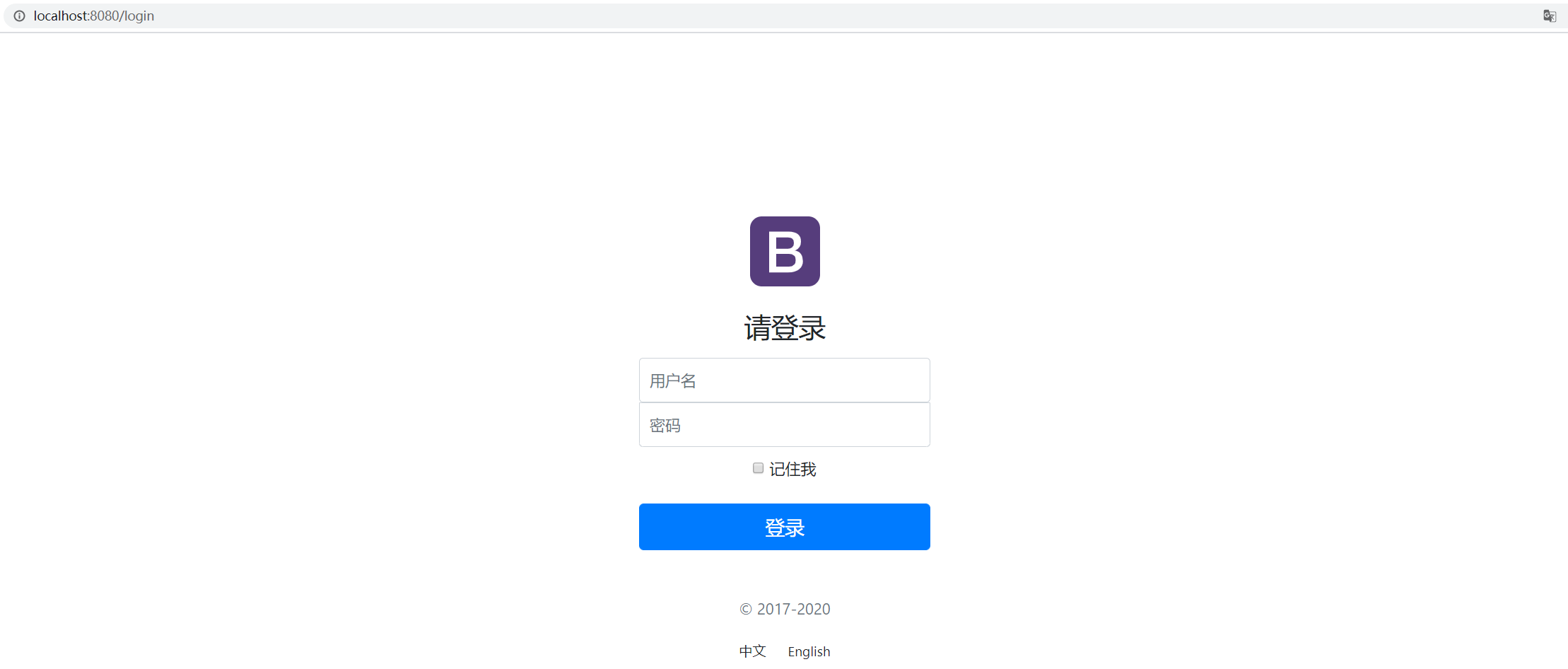
运行演示

启动项目

访问 http://localhost:8080/

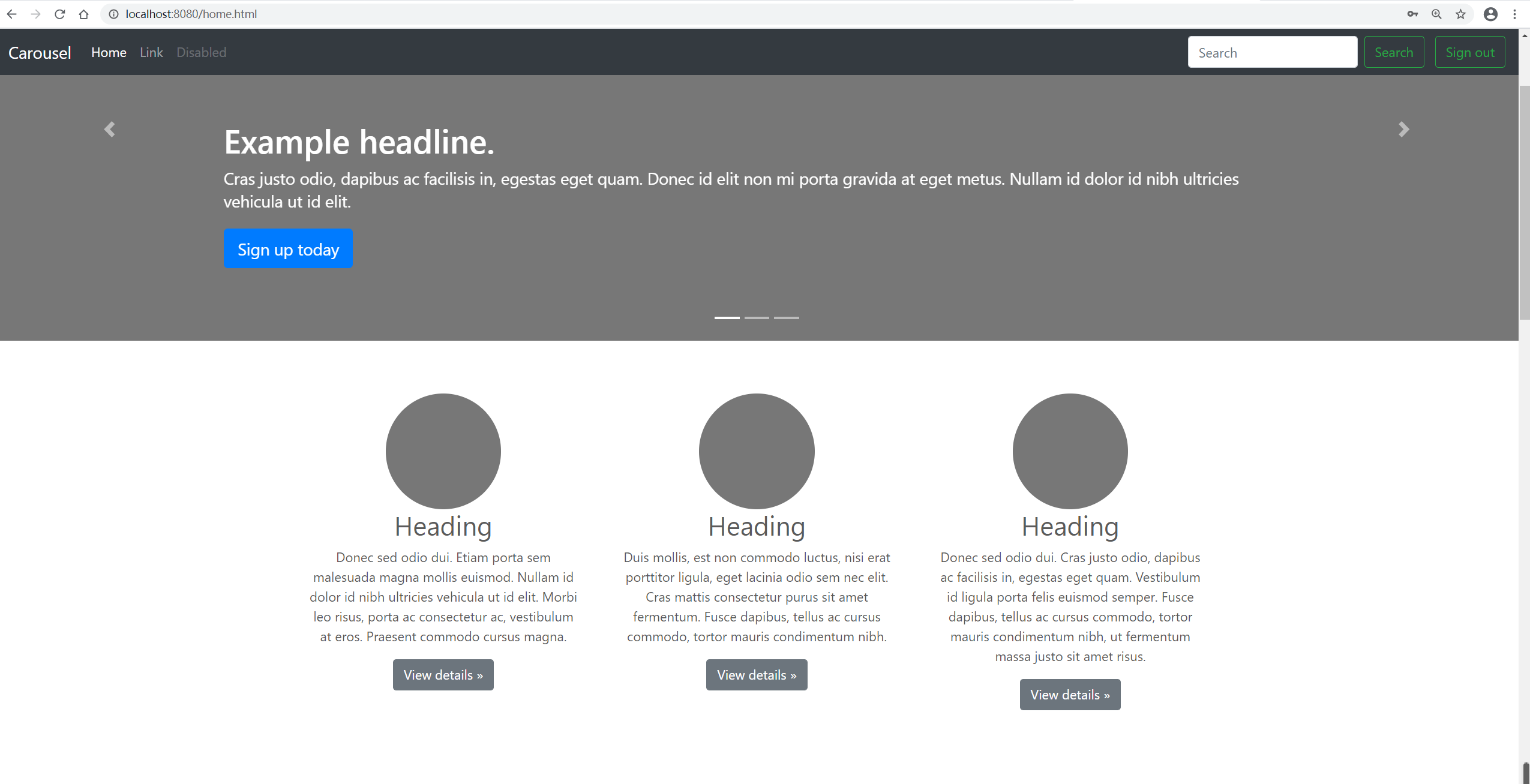
普通用户登录,账号:Jack, 密码:A123456!

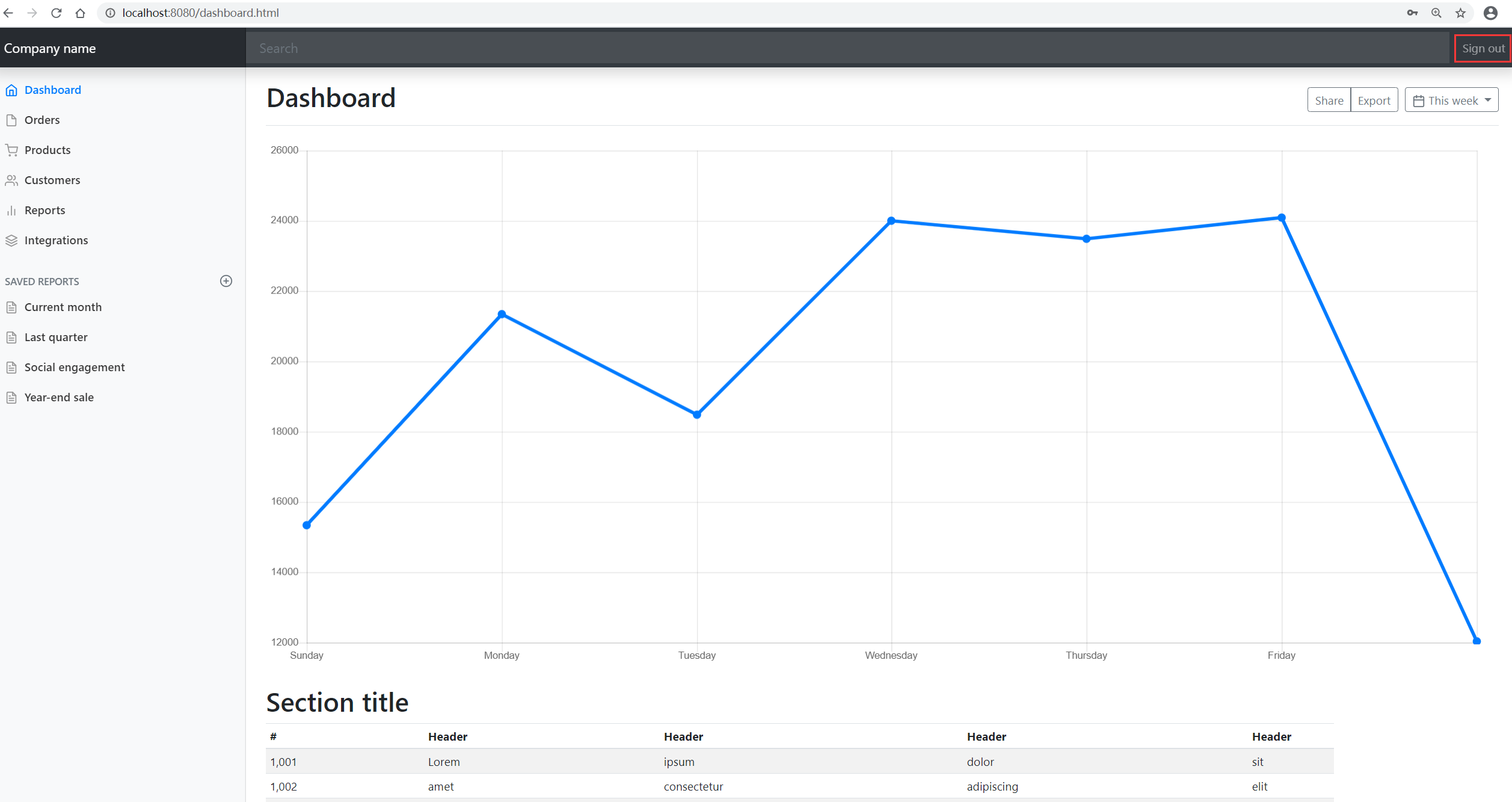
管理员登录,账号:Kevin, 密码:A123456!, 管理员登录成功后可以看到控制台

点击 Console 跳转到 dashborad

点击 Sign out 退出登录

项目已上传至 Github: https://github.com/yekongle/springboot-code-samples/tree/master/springboot-security-login-sample , 希望对小伙伴们有帮助哦。

参考链接:

坚持原创技术分享,您的支持将鼓励我继续创作!